

- Website Conversion Audit Checklist: Quick Version
- What Is a Website Conversion Audit?
- Website Conversion Audit Checklist
- Conversion Checklist by Page Type
- How to Score Your Website Conversion Audit
- How to Prioritize Conversion Problems
- Tools to Help Audit Website Conversions
- Common Website Conversion Mistakes Small Businesses Make
- Conclusion
- Frequently Asked Questions
Attracting traffic to your site is only part of the challenge. If people come to visit your site but do not interact with your company (they do not call, fill out a contact form, or make a purchase), you have a conversion problem. If your site gets visits but few leads, a conversion rate optimization expert can help you find the exact problem.
A website conversion audit checks which parts of your website stop visitors from taking action. A good SEO agency in Delhi can bring visitors to your site, but a conversion audit shows what happens after they arrive. Can your visitors understand your offer? Do they know what to do next? Do they trust your company? Can they complete the process easily on their phone?
The conversion audit checklist for small companies in Delhi provided on this site consists of 40 items focusing on messaging, calls to action, signals of trust, forms, and mobile usability.
It looks into the challenges with the competition in Delhi’s local environment, which requires businesses to establish trust with customers, differentiate from competitors, provide clear pricing, etc. Moreover, verification of customer preferences with regard to queries through WhatsApp or phone calls is very important.
You do not need to redesign your site completely. In many cases, taking first steps means detecting site pages where visitors feel confused, doubtful, or unsure about contacting you.
Follow this checklist page by page. Tick the box ‘Pass’, ‘Needs Improvement’, or ‘Fix now’ for each item. Prioritize issues that may stop visitors from contacting or buying from you.
Website Conversion Audit Checklist: Quick Version
Copy and use this checklist when reviewing a small-business website:
- Clear value proposition
- Customer-focused headline
- Offer is immediately understandable
- Strong primary CTA
- CTA wording explains the next step
- Copy addresses customer problems
- Benefits are clear
- Content matches visitor intent
- Pages are easy to scan
- Customer reviews or testimonials are visible
- Relevant credentials or proof are available
- Business contact information is clear
- Forms use only necessary fields
- Form errors are understandable
- Form submission has been tested
- Thank-you/confirmation experience works
- Alternative contact options are available
- Website works properly on mobile
- Buttons are easy to tap
- Click-to-call works
- Mobile forms work
- Popups do not block important actions
- Pages load efficiently
- Important images are optimized
- Links and buttons work
- HTTPS works correctly
- Navigation is clear
- No important page is a dead end
- Conversion journey has been tested
- Analytics tracks important actions
- Search traffic and landing pages are reviewed
- Pricing information is easy to find and understand
- Service areas and location coverage are clearly mentioned
- Business operating hours and availability are up to date
- Expected response time after submitting an inquiry is stated
- The privacy policy is accessible near contact and inquiry forms
- Forms clearly identify mandatory and optional fields
- Form entries are retained if a visitor makes a validation error
- Appointment booking systems display accurate and available time slots
- Checkout pages display taxes, delivery charges, and additional fees before payment
- Website content and interactive elements are accessible to users with disabilities
What Is a Website Conversion Audit?
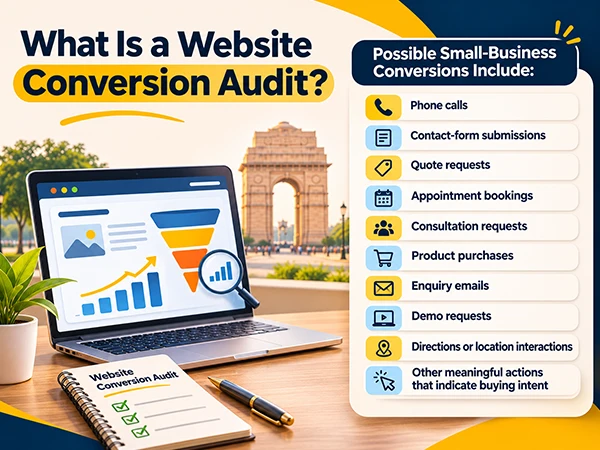
A website conversion audit is an organized assessment of a particular site for identifying any drawbacks that can make it difficult for users to take the desired business step. This could be filling out a form, making a phone call, scheduling an appointment, requesting a quote, or making a purchase.
A classic website audit can look into things like technical SEO, security, indexing, functionality, or content. Unlike a classic audit, a conversion audit has a different aim. It seeks to understand what happens from the moment a user arrives on a page to taking their next step.
A conversion for a small business does not always mean a sale made online. It will depend on how the company gets its customers.
For example, it can mean a phone call or a quote requested for a local plumbing company in Delhi, serving areas such as Dwarka and Rohini. It can be a booking of an appointment for a dental clinic; it can mean a consultation request for a consulting company and a purchase for an online shop.
Google Analytics calls important actions ‘key events’. You can measure them in Analytics. These events can be measured and analyzed in Analytics.
Before auditing a website, define the actions that matter.
Possible small-business conversions include:
- Phone calls
- Contact-form submissions
- Quote requests
- Appointment bookings
- Consultation requests
- Product purchases
- Enquiry emails
- Demo requests
- Directions or location interactions
- Other meaningful actions that indicate buying intent
For example, if a home renovation company in Saket, South Delhi, receives most enquiry by phone, making the phone number easy to find may matter more than adding another paragraph of website copy.
Website Conversion Audit Checklist
The following lists the most important areas that have the opportunity to disrupt the potential online user journey, from the moment a visitor lands on the site to the moment they contact you or make a purchase.
1. First Impression and Value Proposition
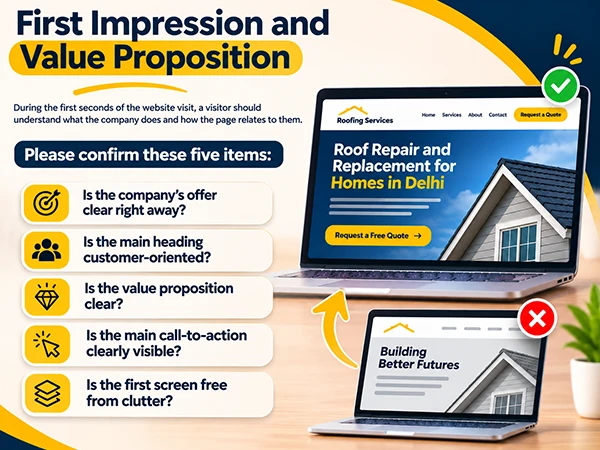
During the first seconds of the website visit, a visitor should understand what the company does and how the page relates to them.
Please confirm these five items:
- Is the company’s offer clear right away? The visitor has to understand the offer of the company without the need to review the menu or scroll through the page.
- Is the main heading customer-oriented? Instead of “Welcome to ABC Services,” it should clarify what services are provided or what result is expected.
- Is the value proposition clear? You must explain your offer, who can benefit from it, and how.
- Is the main call-to-action clearly visible? If the visitor is supposed to acquire a quote, book an appointment, etc., this action must be easily recognizable.
- Is the first screen free from clutter?
- The first screen should not be filled with conflicting information and too many buttons, banners, and sliders.
Example: A local roofing company could use a headline such as “Roof Repair and Replacement for Homes in Delhi” followed by a short explanation and a “Request a Free Quote” button. That is more immediately understandable than a generic headline such as “Building Better Futures.”
2. Website Copy and Messaging
Having established what your business does, the rest of the page should answer the questions visitors ask before they decide. Clear, simple website copy helps visitors decide faster. If writing is not your strength, professional content writing services can help.
- Does the copy tackle issues facing the customers? What problem is your service solving?
- Are the benefits made apparent? Benefits explain why the customer should care about what you do; features present your offerings.
- Does the content satisfy the search intent? Good SEO services start with matching your page to what people search for. If a person in Delhi searches for “emergency AC repair”, then an offer in which content is mostly about HVAC will not match what they searched for.
- Is scanning the content easy? Short paragraphs, headings, and lists make the page easy to scan.
- Does the page answer important user queries? The key points are the following: price, the area served, timeline, the procedure, availability, guarantees, and what happens after the request is made.
3. Call-to-Action Audit

A CTA should be clear enough to make it easy for visitors to take the next step.
- Has the primary CTA been clearly identified? What is the most important action you want visitors to do?
- Has the CTA been written clearly? Phrases like “Get a Quote,” “Book an Appointment,” or “Call for Pricing” will clarify the steps better than simply saying “Submit.”
- Does the CTA appear in an appropriate position? Consider placing the CTA in the top screen area, after important advantages and before the last few sections of the page.
- Are there many competing CTAs? If there are choices, such as “Buy Now,” “Learn More,” “Download,” “Subscribe,” and others, it muddles the selection process for the visitor.
- Is the next step clear once the button is pressed? The visitor should know what to expect: a form, a booking calendar, a checkout page, or some other step.
Give visitors a clear next step when they are ready.
4. Trust and Credibility
Before contacting a company, potential clients look for proof of a business’s credibility and capabilities that suit their needs. For local businesses, a complete Google Business Profile builds trust fast. Use this Google Business Profile Optimization Checklist.
- Can visitors find reviews from past clients, including Google reviews?
- Are your testimonials credible and accurate?
- Is a relevant case study presented?
- Are client or partner logos shown?
- Is the information about your certifications shown if applicable?
- Are your guarantees described when suitable?
- Is it easy for users to find the necessary contact information?
- Is your Delhi address clearly shown?
Trust signals are meant to help in decision-making. For instance, a digital marketing company in Nehru Place could show a brief testimonial from the client along with information about the results achieved. An electrician could provide his location, business name, reviews, and contact information.
5. Forms and Lead Generation

A form may appear to be working perfectly, but it may still be causing needless friction.
- Is the number of fields reasonable? Ask only for information that is relevant at that stage.
- Are the field labels understandable? Users should be able to easily understand what answers to give in each particular field.
- Is the form’s call to action effective? “Request a quote” communicates more than “Submit.”
- Is the form actually functional? Test it yourself.
- Are the error messages understandable? Tell the user which field needs fixing, rather than simply writing “Error.”
- Is the thank-you/confirmation adequate? Confirm that the request was received and explain the coming steps.
Example: A cleaning company serving areas such as Lajpat Nagar may just need a name, phone number, PIN code, and type of service to accept the request. Asking for a full address, company name, position at work, budget, date of birth, and other details may cause unnecessary friction.
6. Mobile Conversion Experience
Your mobile assessment must evaluate the complete conversion process instead of just checking if the homepage displays properly on the phone. Many visitors will find you on their phone, so mobile SEO and usability matter as much as your desktop site.
- Does the design respond to the mobile format?
- Is the content readable without zooming in on the screen?
- Do the buttons on the website have a sufficient size to click?
- Is the click-to-call option in working condition?
- Does the mobile version of the website have forms that users can fill out without any difficulty?
- Do the pop-ups create any problems while navigating through the content and CTA?
- Can the entire conversion process be completed on a mobile device?
- Include WhatsApp inquiry buttons and click-to-call options, as these are important conversion options for many local service businesses in Delhi. It should be in question form, as mentioned above
Google says your site should work well on all devices. Try it out yourself. Open your site on your phone from a Google search result. Find the service, tap the call-to-action button, and complete every step.
7. Speed and Technical Friction
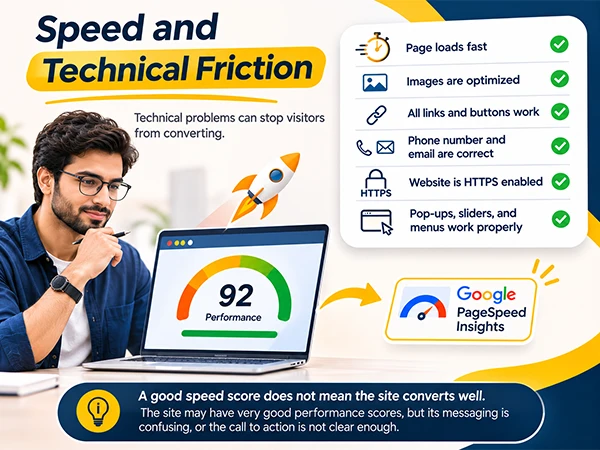
Technical problems can stop visitors from converting. Slow pages, broken forms, and bugs are website development issues that can stop visitors from contacting you.
- Does the page load fast?
- Is the website well optimized for images?
- Are all the links and buttons on the page working?
- Are the telephone number and email address functional and correct?
- Is the website HTTPS enabled?
- Do all pop-ups, sliders, and menus work?
Google’s PageSpeed Insights tests your page on desktop and mobile and shows real-user data and fixes.
A good speed score does not mean the site converts well. The site may have very good performance scores, but its messaging is confusing, or the call to action is not clear enough.
8. Navigation and User Journey
People should be able to go from discovering the business to acting.
- Is the navigation easy to follow?
- Can people get access to crucial information quickly?
- Is there a clear, logical path from information to conversion?
- Does every page lead to a next step?
- Are next steps clear in every part of the journey?
Let’s imagine that someone visits the service page after searching on Google. They learn about the service, but there is no CTA until the last part of the page. After that, they go to the About and Contact pages and then go back to the service page to remember what the company sells.
That is too many steps for one question. So it is worth making sure that the important service page is directly connected with the next logical step.
Conversion Checklist by Page Type
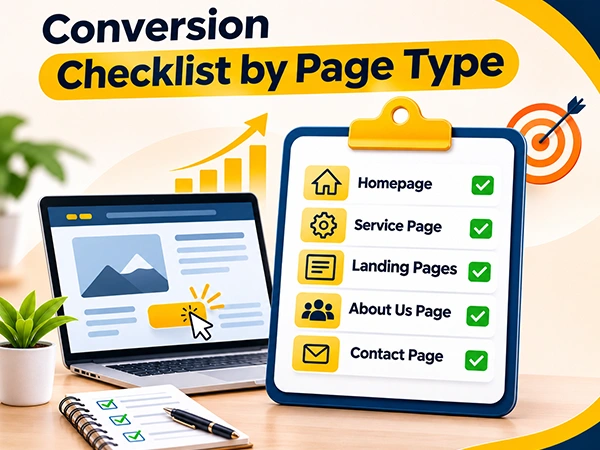
Conversion obligations differ among various pages. So, don’t treat the homepage the same way as the landing page and contact page.
Homepage
A homepage must give a brief summary of the business: what it does, its main services or products, and the next step. A clean website design makes the offer and the next step easy to see.
Check the following:
- Value proposition
- Core service or products
- Main CTA
- Necessary signals of trust
- Contact information that is easy to see
- Links to significant service pages
- Who the business serves
Example: A homepage of a local law firm in Connaught Place must highlight the major services the law firm has to offer.
Service/Product Pages
These pages should provide visitors with information on what is on offer and help them decide whether or not to take any action.
Verify:
- Clear description of your service/product
- Benefits for customers
- Relevant proof/testimonials
- Answers to most frequently asked questions
- Pricing info/input, where relevant
- Service info
- Strong call to action
When a user in Delhi searches for “commercial office cleaning,” they should be led to a page on commercial cleaning and not a general one that talks about the company.
Landing Pages
The purpose of a landing page is to direct the visitor’s attention to a particular service or offering.
The characteristics of a good landing page are:
- The message matches the reason for the visitor’s visit
- A single clear offer
- Strong titles
- Useful information that supports the message
- Elements of trust
- Clear Call-to-Action
- Minimal unnecessary distractions
If your ad offers a free consultation but the page talks about five services, visitors leave.
Contact Page
A contact page should make it easy to get in touch. The following can be said about the characteristics of a good contact page:
- A working contact form
- An easily identifiable phone number
- A business email address if needed
- Address or area for service
- Operating hours if necessary
- Response time
- Contact options
- Availability of a confirmation message after sending the message
For instance, “We will get back to you within one working day” provides the visitors with more information than just saying thanks for your message.
How to Score Your Website Conversion Audit
Use a simple three-point scoring system for each checklist item:
| Score | Status | Meaning |
| 2 | Pass | The element works well and does not present an obvious conversion barrier. |
| 1 | Needs Improvement | The element exists but could create confusion, hesitation, or unnecessary effort. |
| 0 | Fix Now | The element is broken, missing, or creates a significant obstacle to conversion. |
A simple working quote form with clear labels could earn a score of 2. A working form with 12 extra fields could earn a score of 1. The score for a form that fails to submit will equal 0.
It is basically a practical auditing framework and will not serve as an industry-wide conversion score. Simply comparing the score with a score from another company is not valid, because more points do not necessarily mean better business results.
The true value lies in pinpointing specific issues and addressing those issues that are of utmost importance.
How to Prioritize Conversion Problems
Fix problems in this order:
- Firstly, any broken conversion tools, such as forms that cannot be submitted, incorrect phone links, broken booking systems, or issues with checkout.
- Secondly, major UX and mobile issues, like hard-to-read content, complicated navigation, and confusing conversion steps.
- Thirdly, ineffective messaging and CTAs, i.e., not clear offers, bland headlines, and a lack of further action steps.
- Fourthly, trust and credibility issues, including absence of proof, unclear business info, and unanswered concerns.
- Finally, minor design and copy issues.
- Another method is to use the impact-and-effort principle.
- Ask the following two questions for each failure.
- How many more leads could we get if we fix this?
- How complicated is fixing it?
This means that fixing a contact form that takes less than 30 minutes should be prioritized over changing button colors over several days. On a small budget? See SEO Strategies for Small Businesses in India.
Tools to Help Audit Website Conversions
Google Analytics 4 (GA4) assists in monitoring website visits and primary events like phone clicks, WhatsApp clicks, and form submissions.
Google Tag Manager (GTM) allows you to set these events without having to modify any part of the website code. However, just clicking on the phone doesn’t mean the phone call went through, and clicking on WhatsApp doesn’t mean the message was successfully sent. It is essential to validate form submissions, phone calls, and message submissions through WhatsApp to differentiate actions from leads.
Google Search Console provides certain search terms and shows impressions, clicks, and pages generating organic traffic. PageSpeed Insights identifies speed problems for desktops and mobiles. Microsoft Clarity applies heat maps and session recordings for understanding client behavior.
To track your results every month, see What Should Be Included in a Monthly SEO Reporting Dashboard?
Common Website Conversion Mistakes Small Businesses Make
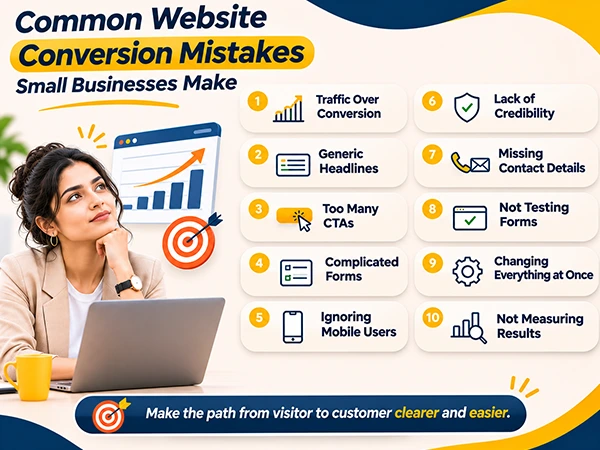
Too often, small business owners make the mistake of setting traffic as the primary goal of their websites. See more errors in Common Website Mistakes Delhi Businesses Should Avoid.
Here is a list of some of the common conversion issues:
- Focusing on traffic rather than conversion: More traffic is not always an answer to the issues a website has in terms of conversion rate.
- Using generic headlines: Visitors will have no idea about the services offered by the business.
- Using too many CTAs: Too many possible actions make it less clear how to proceed.
- Using overly complicated forms: Asking for extra information creates too much friction.
- Disregarding mobile context: A website may perform well on desktop computers but not be easy to use on other devices.
- Lack of credibility: Visitors may be insecure without enough proof of the company’s legitimacy.
- Not providing contact details: Customers should not have to click their way through the website to find out how to contact the company.
- Not testing forms: What worked in the testing phase can break once a website gets live.
- Changing everything at once: Changing the title, the CTA, the form, and the layout at once makes whatever results hard to identify.
- Not measuring results: Changes should be connected to measurable business actions wherever possible.
The goal is not to make a website look different. The goal is to make the path from visitor to customer clearer and easier to complete.
Conclusion
A proper conversion audit of a website is not limited to enhancing the website’s appearance and increasing traffic rates; it also transforms visitors from just random users into interested leads, produces genuine inquiries, and provides positive momentum for long-term business development.
For small businesses in Delhi, small changes in web copy, forms, mobile optimization, user experience, and local info quotes will help users take action faster. This 40+ point checklist will help identify problem areas, prioritize the areas requiring effort, and monitor how successful converting leads will be.
Frequently Asked Questions
What is a website conversion audit?
A website conversion audit is a review of your website to identify barriers that may prevent visitors from taking important actions, such as calling, submitting a form, booking an appointment, or purchasing a product.
How do I audit my website for conversions?
Start by defining your most important conversion actions. Then review your homepage, service or product pages, landing pages, and contact page for clarity, CTAs, trust, forms, mobile usability, technical friction, and navigation. Finally, test the complete journey yourself.
Why is my website getting traffic but no leads?
A website can receive traffic without generating leads when visitors cannot quickly understand the offer, trust the business, or find an obvious next step. If your traffic is coming from the wrong searches, an SEO agency in Delhi can help you target better keywords. The problem could also be a broken form, poor mobile experience, mismatched search intent, or unnecessary friction.
Use analytics to identify which pages and actions are involved rather than assuming traffic itself is the problem. For a full list of causes, read Why Is My Website Getting Traffic but No Inquiries?
What should I check first during a conversion audit?
Check the basic conversion path first. Can visitors understand what you offer? Can they find the main CTA? Does the CTA work? Can they submit the form or complete the booking? Can they do all of this comfortably on mobile? Fix broken conversion paths before spending time on minor design changes.
How can I improve my website conversion rate?
Start by identifying specific barriers rather than changing the entire website. Improve unclear messaging, strengthen relevant CTAs, reduce unnecessary form friction, add appropriate trust information, and make the mobile journey easy to complete. Then measure the relevant business actions to see whether the changes are producing useful results.
There is no single conversion rate that is universally considered “good.” What matters depends on the business, offer, audience, traffic source, and conversion being measured.
How often should a small business conduct a conversion audit?
There is no universal schedule. A practical approach is to review the conversion journey periodically and whenever you make significant changes to the website, forms, booking systems, advertising campaigns, or offers.
You should also investigate sudden changes in inquiries, purchases, or other important actions instead of waiting for the next scheduled audit.
What tools can I use for a website conversion audit?
Google Analytics can help measure important website actions, while Google Search Console provides information about search traffic and queries. PageSpeed Insights can identify performance issues, and Microsoft Clarity can help you understand user behavior through heatmaps and session recordings.
For small businesses, these tools work best when combined with something simple but important: actually using your website like a customer.