

- What Are Core Web Vitals? A Quick Recap
- What's New in 2026: Understanding the Core Web Vitals Update
- How Google Comes Up With Your Core Web Vitals Results
- How to Check Your Own Core Web Vitals
- Why Websites Lose Core Web Vitals Performance
- How Agentic Browsing is Changing Website Performance
- Do Core Web Vitals Still Affect Your Google Ranking?
- How to Fix Core Web Vitals: A Step-by-Step Process
- Conclusion
- Core Web Vitals FAQ
A delayed or unreliable website can deter potential customers from learning about your brand, which is why Google has implemented Core Web Vitals to gauge different aspects of the overall experience that users can have when using the website.
If you have heard that Google provides web pages with a single score for Core Web Vitals instead of three separate scores, it is necessary to point out that this is not how the company describes Core Web Vitals in 2026. Google assesses three different metrics: LCP, INP, and CLS. To achieve a high score based on Core Web Vitals, the web page should achieve the target rate for all three metrics defined by Google.
The good news for entrepreneurs is that they do not need to learn complicated algorithms. All you need to know is how each metric works, where your website needs improvements, and how to make the necessary changes.
What Are Core Web Vitals? A Quick Recap
Core Web Vitals encompass three key metrics meant to assess whether users perceive a webpage to be swift, interactive, and reliable.
Largest Contentful Paint (LCP)
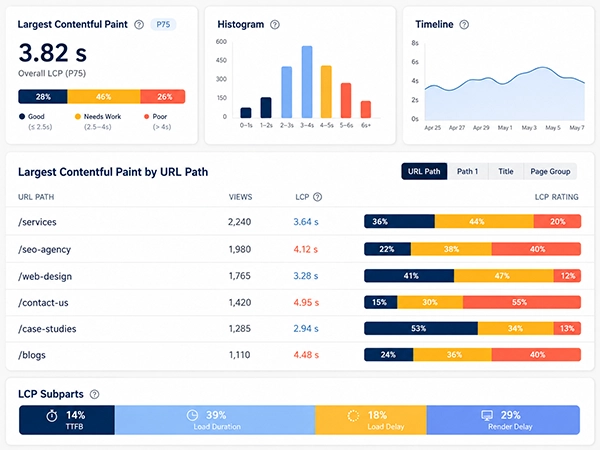
LCP serves to determine how fast the most significant content on screen loads. According to Google guidelines, for optimal user experience, the LCP score should not exceed 2.5 seconds by the time it reaches the 75th percentile.
To put it simply, imagine the user visiting your homepage. The LCP metric tracks the time it takes for a key piece of content, such as the main photo or headline, to load.
Interaction to Next Paint (INP)
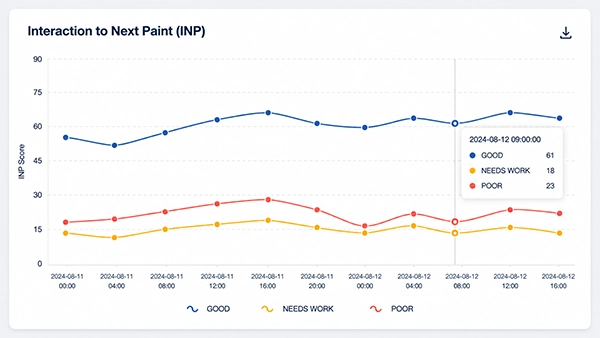
INP quantifies the response time of the site to user interactions. A good score for INP is 200 milliseconds or less at the 75th percentile.
For instance, when a visitor clicks on the menu, opens a product filter, or taps the button, it should happen without delay. A webpage can have fast loading time but a poor INP score.
Cumulative Layout Shift (CLS)
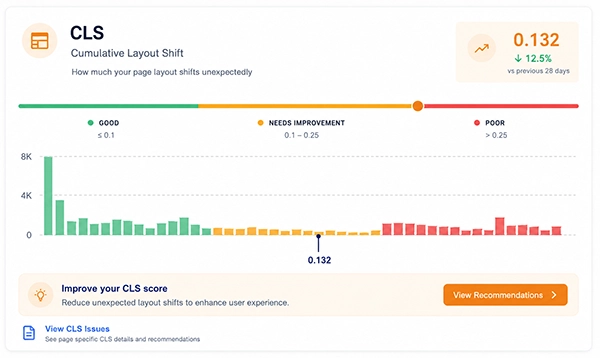
CLS indicates how unpredictable the content is while loading. A good CLS score is any score below 0.1. You may have encountered this issue. For instance, when you intend to click a button, an ad loads over it, and the page shifts unexpectedly, causing you to click something else instead.
What’s New in 2026: Understanding the Core Web Vitals Update
The most significant factor to recognize in the year 2026 is what remained the same.
Google’s latest Core Web Vitals guidelines provide:
- LCP for loading speed
- INP for responsiveness
- CLS for visual stability
Google still advises evaluating these metrics at the 75th percentile for both desktop and mobile. In other words, when it comes to Core Web Vitals, good performance means that all metrics are satisfied.
Currently, there is no unified Core Web Vitals score from Google that includes the three metrics.
It is essential to distinguish between that fact and seeing some numerical score in one of the services, such as PageSpeed Insights. This score is not the same as the Core Web Vitals score because the tool uses different performance measures and analyses, while Core Web Vitals remain three independent metrics connected with the user experience.
For business owners, this is beneficial since they do not have to deal with the confusion of one number but can clearly define the issue:
- Is the main content loading too late?
- Does the website respond slowly to clicks?
- Does the page bounce when loading?
Knowing the problem, one will be able to fix it directly.
How Google Comes Up With Your Core Web Vitals Results
Core Web Vitals are not just based on a one-time test of a website in a lab environment, but on real-world data collected from users. Chrome User Experience Report, or CrUX, is a tool that aggregates user-generated, anonymized data that is leveraged for the Core Web Vitals report.
Google uses the 75th percentile in its calculation. If a website experienced 100 sessions, and its LCP is at the 75th percentile, then it means that 75 of those visited the website with equal or better LCP.
That is why every user does not experience the results that Google suggests based on the Core Web Vitals.
Your website may be loading perfectly on your office computer, but another user may be using:
- A slower mobile connection
- An outdated phone
- A less powerful device
- Bad browsing conditions
- A different experience with the page
It is important to keep in mind that Google has not provided an exact formula for obtaining a final number with LCP, INP, and CLS from Core Web Vitals.
How to Check Your Own Core Web Vitals
You can analyze your website without any technical knowledge.
1. Utilize PageSpeed Insights.
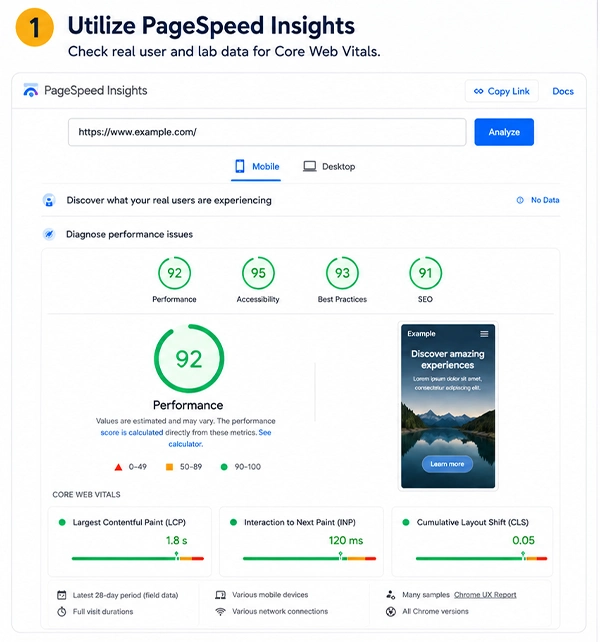
Go to PageSpeed Insights and insert the link to the page to analyze.
This report presents both field data from real users, if available, and lab data, obtained during a controlled test. Be sure to look for the information about Core Web Vitals:
- LCP(s)
- INP
- CLS
And check whether every metric is evaluated as good, needs improvement, or poor.
Screenshot location: There should be a current PageSpeed Insights screenshot with the results of Core Web Vitals as the screenshot must not be outdated.
2. Utilize Google Search Console
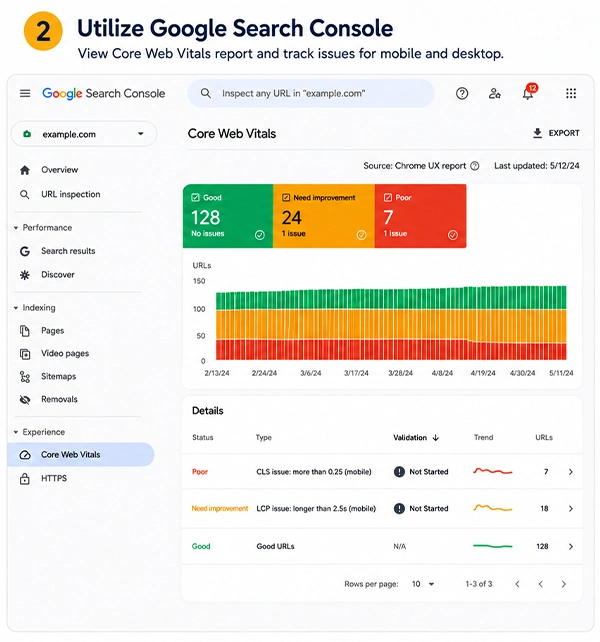
If the site is verified in GSC, go to the Core Web Vitals report in the Experience section. Google Search Console enables you to group URLs affected by the same problem and receive an overview instead of having to analyze every single page.
This feature is especially important for large sites where numerous web pages might suffer from the same issue.
Screenshot location: There should be a relevant screenshot from Google Search Console tools for checking the Mobile and desktop versions.
Why Websites Lose Core Web Vitals Performance
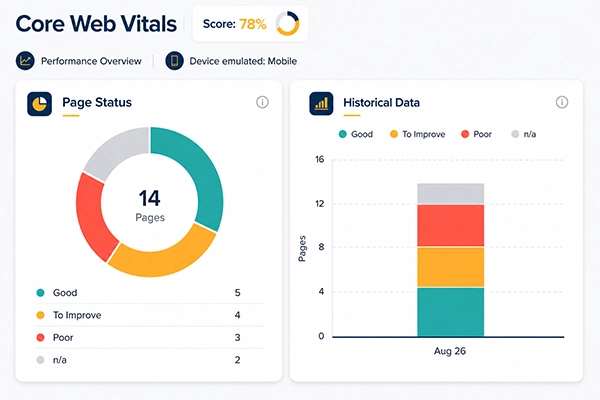
There are very few concrete factors that cause poor performance of a website. However, certain issues arise time and again.
Unoptimized images
Large, unoptimized pictures can take a long time to load and significantly slow down the loading of the main content.
This is particularly relevant to:
- The hero sections of websites
- Product pages
- Service pages
- Websites having blogs full of pictures
- Design portfolios
- Slow hosting services
If the server itself takes too long to serve the page’s content, everything following this stage will also be delayed. Poor server performance can be caused by various things, such as unreliable hosting, congested servers, inefficient databases, and lack of server resources.
Advertising and dynamic content
Various forms of advertising may also result in the content being shifted when loading the webpage.
Too many third-party scripts
Chat programs, collection tools, tracking software, connections with various media platforms, heat maps, advertisements, and other forms of services can create more complexity in the functioning of your browser.
The excessive presence of non-vital scripts makes the task of maintaining responsiveness complicated.
Poorly optimized fonts
Fonts in various forms can also play a role in determining the speed with which the text appears and whether the content changes its visual appearance as it is being rendered. Having a plethora of font files or failing to use font resources correctly will have adverse consequences.
How Agentic Browsing is Changing Website Performance
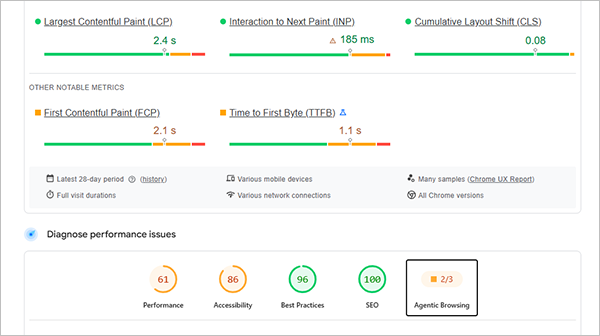
As AI systems have been increasingly browsing websites for users, businesses should not restrict their consideration just to the human browsing experience. Agentic browsing enables AI agents to browse through pages, comprehend the content, and interact with website components in order to finish tasks.
The site should be:
- Quick and responsive: Having a slow website or delayed response could decrease the reliability of automated tasks.
- Plain and comprehensible: Clearly-defined headings, organized materials, and easy-to-use elements let the agents understand the information.
- Stable: Unpredictable changes in the website layout may lead to problems in interaction.
- Easy to navigate: A plethora of pop-ups, scripts, or complicated interfaces may create challenges for automated browsing.
Agentic browsing doesn’t replace Core Web Vitals or introduce a new Google score. On the contrary, it highlights the importance of making fast, accessible, stable, and easy-to-browse websites for both users and AI agents.
Do Core Web Vitals Still Affect Your Google Ranking?
While Google still uses Core Web Vitals in its evaluation of pages’ performance, they are not the only criteria that determine the rank of a page.
Indeed, Google continues to implement Core Web Vitals in its ranking mechanism, but they’re not the only factor affecting a page’s assessment. Google’s ranking algorithms take many signals into account, and high scores in Core Web Vitals can’t offset the low quality of content.
Core Web Vitals are presently utilized for assessing three important aspects of user experience:
- LCP (Largest Contentful Paint): Should take less than or equal to 2.5 seconds for a fast-loading experience.
- INP (Interaction to Next Paint): Should be below or equal to 200 milliseconds to suggest quick page response.
- CLS (Cumulative Layout Shift): Should be 0.1 or less, meaning the page remains visually stable.
The message is clear: fix poor Core Web Vitals, but don’t focus too much on perfecting them. Use Google Search Console to find pages that don’t perform well and try to understand the reason behind it: large images, slow server response times, too much JavaScript, render-blocking assets, etc.
How to Fix Core Web Vitals: A Step-by-Step Process
The first step towards improving Core Web Vitals is to determine the specific issue instead of carrying out random performance modifications.
LCP, INP, and CLS are metrics measuring different aspects of user experience, thus requiring a separate method of optimization. This process also allows minimizing random changes that have an insignificant impact on actual performance issues.
Step 1: Checking Core Web Vitals Performance
Start the optimization process by testing the page using PageSpeed Insights. Enter the URL that you’re interested in and see the results of the Core Web Vitals test.
If there is field data available, then the report will provide you with information on how users interacted with the page in real life, while lab data will give you the results of in-lab performance evaluation. Check the LCP, INP, and CLS scores and see the names of the metrics categorized as good, needing improvement, or bad.
If you own multiple-page websites, you should also look at the Google Search Console’s Core Web Vitals report. It groups URLs with similar performance problems, making it easier to identify whether an issue affects an individual page or a shared website template.
Step 2: Determine Which Core Web Vitals Is Experiencing Problems
After finishing the evaluation, you need to identify which metric requires improvement. Make sure you are not treating all performance problems as loading speed issues.
- A bad LCP signals that the most important content is appearing late.
- A bad INP indicates that your website is unresponsive to interaction.
- A bad CLS indicates moving elements on the page.
This distinction is important because the solution largely depends on the metric that failed. For example, while optimizing an image may enhance the LCP value, it will not solve the INP-related problem caused by JavaScript, and the same is true for other metrics.
Step 3: Discover the Reason for the Performance Problem
After you have established the problematic metric using the diagnostic data from your testing tools, you can identify what is causing the problem. Observe various factors like images, server performance, JavaScript, third-party plugins, ads, fonts, or dynamic content created by your website.
For instance, the big hero image might be responsible for poor LCP, while too much JavaScript or third-party services might be behind bad INP scores. If certain elements are moving while loading the page, find out if images, ads, pop-ups, fonts or any other dynamic elements are given enough space.
Finding the cause is important before making any changes, as Core Web Vitals depend on various aspects of website performance rather than one measurement.
Step 4: How to Fix a Poor LCP Score
If the cause of the issue is LCP, the first thing to do is find the largest component in the above-the-fold part of your page. Very often, this component is either a hero image, some significant headline, or a big piece of content.
If the largest component is an image, try to make it as small as possible while maintaining a decent quality of the picture. Take advantage of new image formats like WebP and AVIF, and choose the image with the correct dimensions rather than sending a bigger file than what your visitor actually needs. Ensure that the main image above the fold loads instantly.
After this step, take care of your server performance. A slow server response may cause all upcoming processes to slow down, which means that unreliable hosting, lack of server resources, bad database, or other server-side issues should be fixed. Consider using a CDN to transfer static content to your audience.
Step 5: How to Resolve a Low INP Score
Low INP typically indicates that there is a time lapse in a page’s functioning in relation to user actions. Start by analyzing the JavaScript involved when users click buttons, open menus, apply filters, complete forms, or take any other action.
Make sure to remove unnecessary third-party scripts and minimize JavaScript code that does not support the key functionality of the website. Services like tracking, chatting, heat maps, advertising, and other scripts can increase the workload for the browser. If too many unnecessary scripts run at once, they can negatively affect responsiveness.
Also, check if any particular task is taking a long time to be completed. Eliminating unneeded browser activity can help tasks to be completed more quickly.
Once you make the required changes, check the interaction again instead of solely relying on how fast a website loads. A site can load quickly but be slow in terms of responsiveness.
Step 6: How to Correct a Low CLS Score
For purposes of improving CLS, it is important to determine which components are at the root of displacement and causing the movement of adjacent elements when the page is being loaded. It is necessary to assign specific sizes to videos and images, allowing the browser to reserve the proper area prior to loading the page.
The same should be done with ads, banners, embeds, and any other mobile objects. The space should be assigned to these elements instead of allowing them to appear and then push the already shown content lower.
Another point worth considering is whether fonts are responsible for the sudden change in appearance and location of the text. Avoiding needless usage of font variations and correctly executing font sources can be efficient for preventing any unexpected visual changes.
When all the necessary changes are done and incorporated onto the page, the page should be refreshed again to check whether it functions properly or not.
Step 7: Test Again and Keep Track of Core Web Vitals Scores
If changes are made to the site’s performance, do not simply assume that the changes were effective because the site seems to be working better. Run the URL through PageSpeed Insights again and compare the LCP, INP, and CLS test results.
If an improvement was made to an image, check whether the LCP has improved. If a script was removed, check whether the interactions have improved as well. If space above the fold is created for future images or ads, verify layout stability.
For problems affecting multiple URLs, check Google Search Console to see how improvements were made. Core Web Vitаls need to be assessed regularly because new images, scripts, plugins, etc., may create new problems.
Conclusion
Core Web Vitals in 2026 continue to be determined by three factors: speed of loading of important content, speed of response of webpages, and stability of the webpage during loading.
There is still no official announcement concerning changes to the three-report system utilized by Google till today. Thus, it is best to concentrate on LCP, INP, and CLS indicators separately, analyze the reports from the real-life example, and understand what the issues are that prevent your visitors from enjoying fast web pages.
If your website encounters some technical issues, please do not hesitate to contact a specialist to get a technical SEO audit done and work on solutions.
Core Web Vitals FAQ
What distinguishes Core Web Vitals from PageSpeed Insights?
Core Web Vitals deliver true user experience using loading time, responsiveness, and visual stability metrics. PageSpeed Insights, on the other hand, has extra perks like performance analysis, suggestions, or testing of any specific page in terms of speed.
Do problems with Core Web Vitals affect conversions on websites?
Indeed, slow loading, bad responsiveness, or poor visual stability can irritate visitors, increase their chances of leaving, and make it difficult to fill out forms, place an order, or make an inquiry, adversely affecting conversion rates and overall business success.
Why do Core Web Vitals work for some pages of the site but do not work for others?
Every page can have unique images, scripts, layout, content, and functionality. Hence, performance issues can impact only specific setups or URLs.
Is it possible for a site to pass Core Web Vitals and have useless results according to PageSpeed Insights score?
It may occur because PageSpeed Insights uses different metrics relative to Core Web Vitals data. Hence, a page may comply with Core Web Vitals requirements and get relatively poor rates from PageSpeed metrics, in particular.
Do Core Web Vitals involve just the speed of the site?
The Core Web Vitals, contrary to the common understanding, cover three experiences: LCP checks loading efficiency, INP measures responsiveness while interacting with the page, and CLS assesses visual stability rather than simply measuring speed.
Should I start with improving Core Web Vitals for mobile or desktop?
In many cases, it is wise to prioritize the mobile part first. This is because mobile users often use complex sites via different mobile devices that are less powerful than other devices. However, reviewing both variants is advisable to understand the actual picture of the page performance.
Can the change of a hosting provider improve Core Web Vitals?
It is possible that changing the hosting provider could make sense if the server response is a bottleneck. However, one cannot hope that simply switching to another hosting provider will solve all problems, since the site might have issues with large images, too many scripts, improper layouts, and inefficient code.
How long does it take to improve Core Web Vitals?
There is no fixed timeframe. Simple fixes like image optimization can be implemented quickly, while server, JavaScript, or website architecture improvements may require considerably more development work.