

- What is Google People Card?
- Why You Need a Google People Card?
- What are the Google People Card Eligibility Criteria?
- What Information Can You Add to a Google People Card?
- How to Create Google People Card?
- How to Edit Google People Card?
- How to Optimize Your Google People Card?
- How to Delete Google People Card from Search?
- Benefits of Google Search Card
- How to Make Full Use of Google Search Card or Add Me To Search?
- Why Add Me To Search is Not Showing?
- How Long Does Google People Card Take to Appear?
- Conclusion
- Frequently Asked Questions
Update (2026):
Google’s “Add Me to Search” feature, also known as Google People Cards, is no longer available for most users. Google discontinued the service in 2024, and new People Cards can no longer be reliably created, edited, or displayed in Google Search results.
If you are searching for:
- Add Me to Search not working
- Google People Card disappeared
- Unable to create a People Card
- Edit My People Card not showing
The issue is likely due to Google’s discontinuation of the feature rather than an account problem.
What Should You Do Instead?
For personal branding and online visibility, we recommend focusing on:
- Creating a professional personal website
- Optimizing your LinkedIn profile
- Building an active social media presence
- Implementing Person Schema markup
- Publishing expert content regularly
- Creating and optimizing a Google Business Profile (for businesses and consultants)
These methods provide a more sustainable and long-term way to establish your online presence than relying on a discontinued Google feature.
Do you want to know what a Google People Card is? This article will precisely answer this question. Google is a search engine and is known to serve users on the basis of search queries made by them. To achieve this, it uses several algorithms. With the passage of time, Google has evolved a lot and introduced Google’s People Card. It facilitates people to build a virtual card using which an individual can have his/her identity and related information at the top of search results whenever searched. You can make use of keyword research tools to make your profile attractive and sound.
The methodology for creating the Google People Card has been provided in this article, along with additional details on its need and more related facts.
What is Google People Card?
Google People Card, or a virtual visiting card, is a kind of information module consisting of several details like personal, work-related, social media, website, etc. Earlier, this facility was limited to mobile users, and later on, it expanded to everyone.
The main motive behind this was to allow the people card on the top of search results. So, in addition to related search results, people cards could also come to the top. And hence, increase the visibility of the people across the search result pages. Earlier, it was called a profile card.
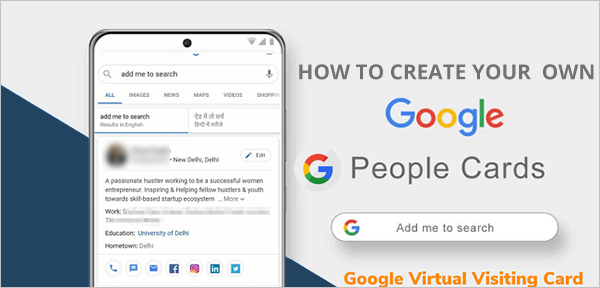
So, with the inception of these Google search cards, Google has declared to use an automated technique instead of adding a “flag” feature with them. With the help of this, there is no need to mark a flag on the card if any card violates the content policy because all the information will be taken care of in an automated way.
As a result, the most appropriate and correct information will be available on the search result pages, and there will be no old and outdated way of reviewing the cards.
Why You Need a Google People Card?
If you are thinking, why exactly is it required to opt for a Google People Card, I would suggest it is the most trending. Moreover, Google has a history of coming up with box ideas for users; two such examples are the Google People Card and Google Easter Eggs.
And furthermore, let us understand it in brief with the help of a situational example.
Did you ever search for any famous personality? If yes, you might have seen that the details about them are available in abundance. And additionally, there are several dedicated information portals, giving a lot of knowledge about them. But whenever you search for the least famous person, or not so famous at all.
Do you get the relevant information? The answer to this question is a big “NO”. So, what should be done? Because there are so many entrepreneurs, freelancers, influencers, etc. who are least famous and are in the struggling phase of their careers, and for them, it is essential to come up on the search result pages.
So, for them, the only solution is a Google People Card, as using this, users can highlight themselves at the top of search result pages, and eventually, it will aid their presence on the internet.
Also, if you are a new businessman (freelancer) and do not have your own website or social media handle, do not worry, as a Google People Card can easily solve your problem. It is designed to help upcoming business professionals who lack a digital presence and want to have it in a single shot.
Let’s now dive into the bigger question of how to create Google People Card, its benefits, and even how can you delete Google People Card.
What are the Google People Card Eligibility Criteria?
To create a Google People Card, you must have to meet with some of the important add me to search requirements, such as:
- You must be located in an eligible country, like India, South Africa, Nigeria, and Kenya.
- You must use a mobile device with an active Personal Google Account (workplace or brand account won’t be valid).
- Your Google account Web & App Activity must be turned on.
- To verify your identity, you’ll need a verified, active mobile number associated with your Google account.
- Your preferred language must be set to either English or Hindi.
- Prepare proper links to your other social media profiles, like Instagram, Facebook, X, LinkedIn, or any other medium.
What Information Can You Add to a Google People Card?
In the Google People Card field, you can add several pieces of your personal information that entirely define your identity and professional skills, such as:
- Full Name
- Education and Qualifications
- Occupation with Detailed Experience
- Website
- Social Media Outlets Links
- Address
- Email Address
- Phone Number
- About Section (for short info)
- Profile Picture
How to Create Google People Card?
Do you want to know the answer to how to create Google People Card to utilize the “add to me search” feature? This section of the article will cater to your needs. After knowing enough details about the Google People Card and its need, it’s time to know how to create one for yourself.
So, let us start with the steps to create a people card or activate the “Add me to search card” feature.
Step 1: Firstly, open up the Google Chrome browser on the cellphone.
Step 2: Now, you are required to enter the keyword “add me to search” or “add me to Google search” in the search box as shown below in the image.
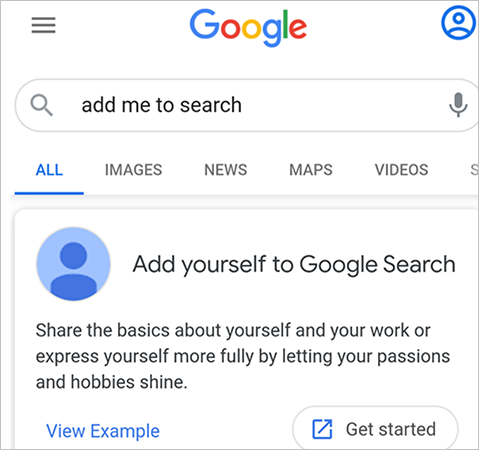
Step 3: Google will show you some results, and click on “Get Started”, as shown above in the photo.
Step 4: Now, it is time to log in to your Google account if you have not.
Step 5: A new window will come up asking you to verify the phone number. So, enter the phone number and also select the country code from the dropdown; later on, choose the “Next” button. Get the idea from the below-mentioned image.
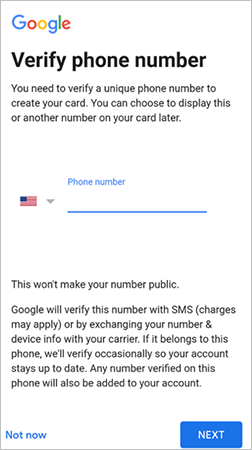
Step 6: Now, you can enter all the details one by one. You can add social media handles, website links, etc. Once it is done, click on the “Preview” button.
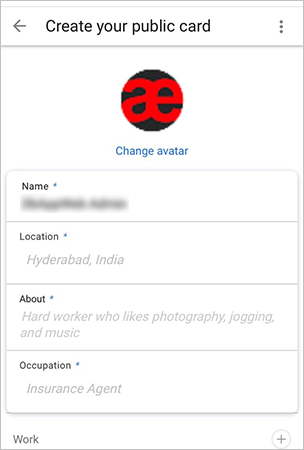
Step 7: If you are satisfied with the preview, you may proceed ahead and click on the “Save” button.
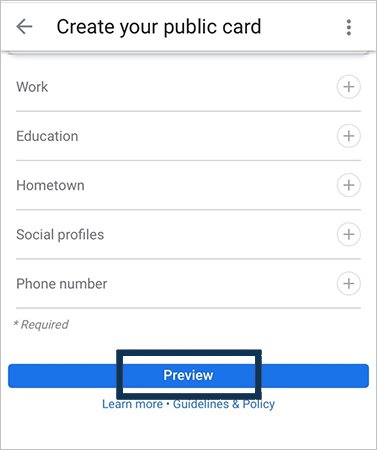
So, by following the above-mentioned steps, you may have the people card created or be able to activate add me to search feature successfully. If you are still not able to create a card for yourself, get the below-depicted requirements done before you start with the procedure; these are:
- Devices that are permissible for card creation are phones, tablets, iPhones, or iPads.
- The browser used for this purpose should be either a mobile browser or Google Chrome. Here, Google Chrome is used.
- A Google account is also needed.
- The “Web & App Activity” feature should be turned on.
These are the basic instructions in order to add yourself to Google Search. So, don’t forget to go through them before beginning this process of Google search card generation.
How to Edit Google People Card?
If you have mistaken something in the card while entering the details, and now you are looking to modify it. Do not worry, as the procedure to correct the entered information is given below.
- Step 1: Hold your cell phone in your hand.
- Step 2: Open up the Google Chrome web browser on your cell phone.
- Step 3: Log in to your Google Account by entering the correct credentials.
- Step 4: Now, enter “Edit My People Card” in the search box of the web browser.
- Step 5: You will see the edit option in the top right corner of the Google People Card; click on it.
- Step 6: Now, all entered details will be shown on the screen; proofread and modify them.
- Step 7: Once done with it, click on the “Preview” button to check all the entered details.
- Step 8: Now, in order to save the details, click on the “Save” button.
This is how you edit my people card. That’s it. Now your Google People card has been modified and updated. So, soon enough you will get to see the updated card. Have patience. Don’t you think adding yourself to Google search was way easier than ‘edit my people card?’ So, make sure you commit no mistakes.
How to Optimize Your Google People Card?
Creating a Google People Card is not just enough! To make your Google virtual visiting card stand out from the hundreds of search results with more professional visuals, you have to optimize it. A well-maintained and a proper detailed attracts more users and may significantly increase the chances of getting clicks on your profile and other social links.
Here’s how you can optimize your Google People Card following some simple methods:
- Refine Basic Details: Ensure you add your full name that matches with other professional accounts. Also, mention your city or region and current job profile with a proper company name.
- Use High-Quality Profile Picture: Upload a clear, high-resolution image that helps immediate recognition and builds trust. Avoid using filter-loaded or low-resolution pictures of yourself.
- Create a Keyword-Rich Introduction: Keep your introduction short, precise, and engaging, including your profession, skills, and accomplishments. Along with this, incorporate SEO-friendly keywords or phrases related to your industry to improve the chances of visibility in targeted searches.
- Link Your Professional Accounts: Recheck the added links, if any. If not, include your website, portfolio, or other social media accounts linked to your Google People Card. This will help you drive an increase in organic traffic and allow users to go through your professional background effectively.
- Consistently Update Your Google People Card: Google prioritizes accurate and updated profiles. So, whenever you change your job, accomplish a new reward, or shift from an existing location, update your add me to search card immediately.
How to Delete Google People Card from Search?
After creating the People Card, Now, if you are willing to remove it from Google search and do not want to continue with it. Follow the steps below.
Step 1: Open up the Web browser on your smartphone and log in to your Google account.
Step 2: Type the keyword “Edit My People Card” in the search box.
Step 3: Go to the edit option of “People Card.”
Step 4: Once the card details are opened up, scroll down and locate “Remove my search card from Google”. Click on it.
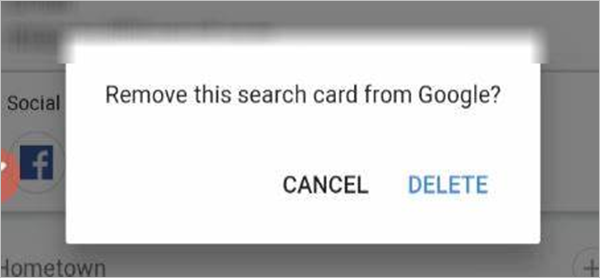
Step 5: Now, a confirmation pop-up will come up; confirm it, and all your details will get deleted from the search engine.
This way, you will get the Google People Card deleted from the search engine.
So, these were the details about the Google Search Card, and if you are a novice or have very little knowledge about it, you will find the information mentioned above in the passage useful. In addition to the creation of cards, its various segments like editing and deletion, etc., have also been covered.
Benefits of Google Search Card
There are many benefits of the ‘add me to search’ feature. Are you intrigued to know about it? Then all you need to do is sit back and read through this section of the article. No one can deny that this card is loaded with benefits; all you have to see it through a clear vision.
- Creating a Google virtual visiting card is one of the easiest and most simplified ways for enhancing personal branding on search engines. Many budding bloggers and influencers use it for this purpose.
- This card can, in a nimble way, update your professional information and allows you to build effective credibility and improved online discoverability.
- It helps in building connections and widening your networks.
- All the information you provide is protected by Google security personnel.
- Google Search Card can contribute to the acquisition of knowledge panels but is controlled by the Google algorithm.
- One of the benefits of Google People Card is that it fills your professional bag with many advantageous opportunities. For instance, freelancers can attract more clients and work.
With so many listed benefits of it, what are you waiting for? Add yourself to Google Search and be successful in your professional life.
How to Make Full Use of Google Search Card or Add Me To Search?
If you want to make yourself and your firm successful, make full use of add me to search. Want to know how to do it? All you need to do is go through these pointers, which are specially crafted for you.
- Make sure all the information your Google Search Card possesses is crisp and up to date. This will make people locate you easily. To do so, you can employ types of propaganda used in advertising.
- You will have to ensure that your Google Search Card follows all community rules and does not go against the security protocols of Google.
- Always keep in mind to upload your authentic picture as your profile picture. And do not use anyone else’s picture or any vague picture of any artist. And if you already have it, make sure you edit your people card profile once you are done with this article.
- It’s a big no to vulgarity from Google, so never use double-meaning words with sexual connotations.
- If you are someone who makes use of slang words, kindly avoid them.
- Avoid taking a stand on anything; be a neutral person. Don’t use the platform to advertise for yourself or your firm. These tactics could dent your profile.
- Google Search might delete your Google Search card or index if you are inactive for a long time or have had no updates or changes in your profile.
These are some pointers that can help you make the full benefit of adding me to the Google Search feature. So, don’t forget these instructions to bloom your Google Search Card profile.
Why Add Me To Search is Not Showing?
If your Add Me to Search or Google People Card not showing, it might be possible you are not strictly adhering to the eligibility criteria or violating any policies. To troubleshoot this issue, here’s what you can do.
- You must be native to an eligible country, like India, South Africa, Nigeria, and Kenya.
- The preferred language should be English or Hindi only.
- “Add Me to Search” features only work on mobile devices (Android, iPad, and iPhones), via the Google Chrome browser or the Google Search App.
- You must be logged into your Personal Google Account. For instance, name@gmail.com.
- Ensure your Web & App Activity toggle is on.
How Long Does Google People Card Take to Appear?
Usually, a new Google People Card appears in a few hours or sometimes may take up to 24 hours to appear on the SERP, depending on your information verification and indexing speed. If not, consider the following factors.
- If you have used a common name or are similar to any famous personality, try to add a unique phrase in your bio (eg., Mumbai blogger or Delhi software engineer). This will make your Google virtual visiting card stand out and allow the search engine for easy indexing.
- Try to look for your add me to search profile card on the Incognito or private browsing window to ensure you are viewing the most recent results.
Conclusion
By now, you must be able to understand and apply the procedure of using the “add me to search” feature and eventually getting a Google People Card for yourself. This could be a magical wand for you if you want to add yourself to Google Search and become famous for your skills. In case you are a freelance developer or writer, this can help you get freelance web developer clients.
This article has clearly defined the ways of opening a search card in the most nimble way possible. If you still have some questions to ask, you can comment below. We will be happy to connect with you and resolve your issues.
Frequently Asked Questions
What is Google People Card?
It’s a Google feature that allows users to create a digital profile or virtual business card directly within the Google Search Engine Result Page. This card acts like a personalized landing page, highlighting an individual’s name, work info, contact details, skills, and more.
Is Google People Card free?
Yes, the Google virtual visiting card is 100% free to create and manage. You only need a mobile device, a personal Google account, and a verified, active mobile account.
Who can use the add me to search feature?
The add me to Google search feature can be used by any individual, such as freelancers, professionals, entrepreneurs, or public figures.
How many People Cards can one person create?
A single person can only create one Google People Card for themselves.
What is the difference between Google People Card and Google My Business?
Google People Card feature is specifically introduced for a indivduals, allowing them more enhanced and effective personal branding. Whereas Google My Business is designated for business owners who want to showcase their timings, location, and customer reviews to online shoppers.
What are the common mistakes to avoid while creating my Google People Card?
You must avoid stuffing keywords in your bio, leaving important sections blank, adding broken links, and using low-resolution or filter-loaded pictures to your profile card.
How to rank higher with Google People Card?
To rank your profile card higher, you need to improve your profile credibility. For instance, fill all the required sections with accurate information, connect at least 2 to 4 other social profiles while maintaining consistency, and timely update your profile with recent accomplishments.