

- What Is Google Business Profile?
- Google Business Profile Optimization Checklist
- Google Business Profile Optimization Checklist for Different Business Types
- Google Business Profile Optimization Mistakes to Avoid
- How Often Should You Optimize Your Google Business Profile?
- How to Check if Your Google Business Profile Is Optimized
- Does Google Business Profile Optimization Improve Local SEO?
- Google Business Profile Optimization Checklist — Quick Version
- Final Takeaway
- Frequently Asked Questions
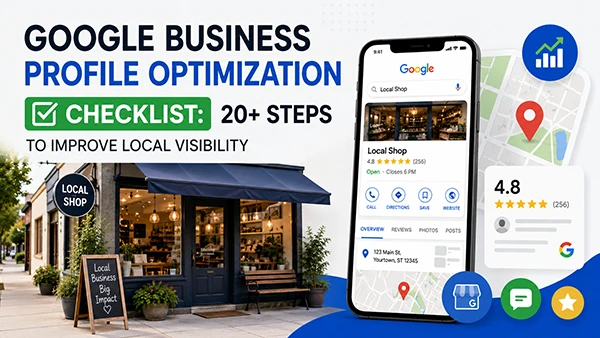
A Google Business Profile (GBP) is a free business listing tool that empowers you to manage how your business appears on Google Search and Google Maps. According to Google News’ blog, it was first introduced in June 2014 as Google My Business and later rebranded to its current name in 2021. So, what exactly is Google Business Profile optimization?
Google Business Profile optimization is the process of completing, updating, and improving a business’s Google Business Profile so that customers can understand the business and Google can better match it with relevant local searches. For local businesses, an optimized profile can improve search visibility and make it easier for potential customers to connect with your business, boosting both online organic traffic and footfall.
Therefore, this Google Business Profile optimization checklist covers 20+ practical steps to help you improve your business listing, strengthen local presence, attract more potential customers, and stay competitive in Google Search and Maps.
What Is Google Business Profile?
Google Business Profile (GBP) is a free business listing tool that helps brick-and-mortar stores manage how their information appears across Google Local Search and Google Maps. Launched in June 2014, it was rebranded to its current name in 2021.
When a user searches for a particular service, product, or brand, a well-optimized GBP can help a business appear in relevant local search results and on Google Maps. This helps customers quickly find business information, including NAP (Name, Address, and Phone Number), photos, videos, service menus, product lists, customer reviews, and owner responses.
Therefore, keeping business information accurate is essential to attract more customers while building a strong online reputation across the SERP. An outdated phone number or wrong address can negatively impact brand reputation, making you instantly lose your potential customers.
| What is Google Business Profile Optimization? Google Business Profile optimization is the process of completing, updating, and improving your Google Business Profile listing so that your brand can rank higher on Google local search results and Google Maps, attracting increased organic traffic. |
Google Business Profile Optimization Checklist
The most important GBP optimization steps are verifying the profile, choosing the correct category, keeping business information accurate, adding relevant services and photos, managing reviews, and monitoring performance.
Below, we’ve outlined 20+ easy Google Business Profile checklist steps to help you optimize your profile and keep your business information accurate and complete. Go through each step carefully to make the most of your business listing.
1. Claim and Verify Your Business Profile
To edit your business information on Google, such as business name, operating hours, locations, services, product details, and more, you need to verify your Google Business Profile. Google verification confirms that you are authorized to manage your Business Profile and helps establish that the business represented on the profile is legitimate.
Checklist:
- Claim the correct Google Business Profile.
- Verify your business.
- Make sure the correct business owner/account has access.
- Check whether duplicate profiles exist.
- Resolve the verification problem.
- Resolve if there are any suspensions or profile-disable issues.
Bonus Tip: Do not create a new Google Business Profile just because your existing one has verification or ownership issues. The right solution depends on the specific issue, so follow Google’s recommended support or appeal process.
2. Keep Your Business Name Accurate
According to the official Google Business Profile guidelines, use the exact real-world business name that primarily appears on your storefront and official branding.
Checklist:
- Use the real business name accurately.
- Don’t stuff keywords into the business name simply to manipulate rankings.
- Keep branding consistent.
- Don’t add locations or services unless they are part of the legally registered business name.
Bonus Tip: Ensure your Google Business Profile name matches the offline one to prevent Google suspension or any other verification/ownership issue.
3. Choose the Right Primary Business Category
Choosing the right category for your Google Business Profile helps Google understand your business relevance. The primary category helps Google understand what type of business a profile represents and should accurately describe the business’s main offering.
Checklist:
- Use as few categories as possible to describe the core of your business.
- Do not add categories solely as keywords or to define your business’s attributes.
- Avoid choosing categories just because your competitors have used them.
Bonus Tip: Your selected business category should complete the sentence: “This business IS A”, rather than “This business HAS”. Focus on defining your business holistically instead of stating the services or products you offer.
4. Optimize Your Business Address and Service Area
Use an accurate location, address, and/or service area to describe your business location. You can include suite, floor, and building numbers to be precise about your brand’s offline whereabouts. Also, do not include information in your address line that doesn’t pertain to your business’s physical location, such as URLs or keywords.
Checklist For Storefront Businesses:
- Add the correct address of your physical store.
- Add a map pin.
- Be precise about your location, adding suite or floor number (if applicable).
Checklist For Service-Area Businesses:
- Add city and zip codes.
- Add service areas you serve.
Point to Remember: A business should not use a mailing address for its Google Business Profile if it does not actually operate there. An eligible business location must be a real place where customers can visit the business during its operating hours and where the business is appropriately staffed.
5. Update Phone Number and Website
Adding correct contact information to your Google Business Profile allows individuals to connect with you easily, building trust, credibility, and a strong brand reputation.
Checklist:
- Correct primary phone number.
- Local number where appropriate.
- Accurate website URL.
- Mobile-friendly landing page.
- Avoid adding broken URLs.
6. Add Accurate Business Hours
Provide regular customer-facing hours of operation, so that customers who travel to your location find your place open and enjoy a satisfying experience.
Checklist:
- Regular Hours
- Holiday Hours (any special occasion closing or late opening)
- Special Hours (for instance, weekend timings)
- Temporary closures.
- Avoid displaying incorrect opening times.
Bonus Tip: Incorrect business hours can create an immediate customer-experience problem. So, adding correct timing is not just good for Google Business Profile SEO, but also maximizes customer trust in your brand.
7. Write an Effective Business Description
Add an accurate, useful business description in up to 750 characters, describing what your business is, services/products, location, and the rest.
Checklist:
- Clearly explain what the business does.
- Mention major products/services naturally.
- Include location context where relevant.
- Write for customers first.
- Avoid keyword stuffing.
- Avoid promotional claims that aren’t supported.
Remember, your business description space is where you write for your customers, explaining what you are and what they can expect from you; don’t force words here for ranking or visibility. For example, instead of “ We are the best SEO company,” try to write, “We are a leading SEO company in Delhi NCR, offering complete digital marketing services”. This delivers a more profound understanding to both search engine crawlers and your targeted audience.
Bonus Tip: For a business description, instead of targeting online ranking, write what your target audience wants to know about you and the plus points that make you stand out from other competing brands.
8. Add Products and Services
According to the latest Google documentation, businesses can organize services into categories and add descriptions and prices where applicable. Hence, this is your chance to accurately explain your services/products to your targeted audience.
Checklist:
- Precisely add all your important services.
- Organize services into relevant categories for better understanding.
- Add useful descriptions.
- Add prices where applicable.
- Keep services aligned with the website.
Bonus Tip: Adding your complete product and service descriptions with their costs helps customers make decisions. Try to add high-quality pictures with your correct pricing to potentially turn your traffic into profitable customers.
9. Add Relevant Business Attributes
To highlight your primary factors and help customers easily find you on the Google Search Results and Google Maps, add relevant and specific business attributes to your profile.
Checklist:
- Accessibility
- Payment options
- Amenities
- Service Options
- Business-Specific Attributes
Bonus Tip: Remember each business has its attributes. Carefully check the categories and other available options to accurately define your business offerings to customers.
10. Optimize Your Google Business Profile Photos
Nowadays, online users prefer visual content (photos & videos). Google itself recommends clear, well-lit images that accurately present your business and its theme. Therefore, your GBP must have a high-quality logo, cover photo, interior/exterior capture, team image, product/service or work visuals, and other authentic photographs.
Checklist:
| Photo Type | Suggested Purpose |
| Business Logo | Broad brand recognition. |
| Cover Photo | First visual impression. |
| Team | Builds familiarity among online users. |
| Exterior | Helps visitors identify the location and nearby places. |
| Interior | Represents the business environment. |
| Products/Services | Showcase the primary offerings. |
| Work/Service | Demonstrate expertise and trust. |
Bonus Tip: Do not add fake images to your GBP; this violates Google Business Profile optimization checklist guidelines. Besides, always prioritize high-quality images (in JPG or PNG format) and regular updates to maintain a fresh appearance.
11. Add Videos to Your Business Profile
Google allows businesses to add up to 30-second videos (up to 75 MB) in 720p or higher resolution. Thus, try to constantly add short clips of your business, service/products, and teamwork for strong customer engagement and improved search visibility and rankings.
Checklist:
- Short business videos
- Product/service demonstrations
- Behind-the-scenes content
- Authentic footage
- Avoid misleading or heavily manipulated content.
Bonus Tip: Just like images, keep your videos authentic and representative of your business. Capture your interior, exterior, products, or services accurately. You can also turn longer videos into short clips and share them on your GBP as optional content to help customers learn more about your business.
12. Build a Review Generation Process
Google explicitly prohibits incentives in exchange for reviews. Instead of getting fake reviews to manipulate rankings, try to encourage genuine reviews from your real customers.
Checklists:
- Ask genuine customers for reviews.
- Make review requests easy.
- Use Google’s review link/QR code.
- Don’t buy reviews.
- Don’t incentivize reviews.
- Don’t manipulate ratings.
- Don’t ask only for positive reviews; negative comments are not always bad.
Bonus Tip: You can try automated reminder message services for your customers to gain increased feedback on your Google Business Profile. Also, do not forget to share a working feedback link with your customers after they purchase from you.
13. Respond to Google Reviews
Responding to your customers is a must! Whether you get positive or negative feedback, always reply to the review. This will help build credibility and trust among your customers and online visitors, improve brand reputation, and increase local search visibility.
Checklist for Positive Google Reviews:
- Thank the customer.
- Mention something relevant and positive.
- Keep responses natural and engaging.
Checklist for Negative Google Reviews:
- Stay professional and polite.
- Don’t argue back with the customer.
- Avoid exposing private information.
- Address the concern and try to fix it (if possible) or just show your concern.
- Move complicated discussions offline.
Bonus Tip: Whether you receive positive or negative feedback, never lose your professionalism, and try to maintain consistent communication with your customers to encourage repeat visits and build trust.
14. Create Google Business Profile Posts
Besides adding business information, you can also regularly post on your profile to update your targeted audience about your services/products, latest changes, and many other things. This may also include:
- Updates
- Offers
- Events
- Announcements
- New Products/Services
Point to Remember: Regularly posting on your GBP helps increase customer communication and engagement while attracting more clicks.
15. Add Booking, Appointment, Menu, or Other Relevant Links
Depending on your business niche, you can also add your service link to accurately present your business on Google Search Results and Google Maps. For example, if you are making a profile for the health sector, try to add an appointment link for easy bookings. Whereas, for eateries, they should provide their menu card with clear dish names and pricing.
Checklist:
- Appointment links
- Booking Links
- Menu Card
- Ordering Options
- Product/Service Information
- Other Customer-Action URLs
Point to Remember: We have mentioned this section’s checklist in general. It may vary by business. For this Google Business Profile optimization checklist pointer, focus on adding a relevant customer-action link that allows visitors to take a specific action, such as booking an appointment, placing an order, or making a reservation.
16. Add Social Media Links Where Available
To showcase your business more effectively, add your social media outlet links to your GBP. This will help your visitors explore your brand thoroughly, building a strong brand reputation, credibility, and authenticity.
Checklist:
- Keep social profiles accurate
- Use official business accounts.
- Maintain consistency between GBP and other online profiles.
Bonus Tip: Make sure you are actively promoting the added social media profiles, preventing any sort of poor impact on your visitor trust and experience.
17. Keep Business Information Consistent Across the Web
Among all the competing businesses in the digital sphere, NAP (Name, Address, and Phone Number) consistency is useful for accurate business information. across all their digital presences. This not only improves local search visibility and ranking, but also encourages Google to legitimize your business.
Checklist For Where You Have to Maintain Consistent NAP:
- Google Business Profile
- Website
- Business Directories
- Social Media Profiles
- Local Citations
Bonus Tip: Besides NAP, make sure your information is accurate and consistent where applicable rather than necessarily identical across every platform. This will give a clear idea of your offering to your target audience, building trust and credibility.
18. Check for Duplicate or Incorrect Profiles
Often, duplicate or incorrect business profiles confuse both visitors and Google crawlers when determining your original GBP. So, ensure your brand consists of a single, legitimate business listing profile and does not have other replicas.
Checklist:
- Manually search your business on Google Search.
- Look for the business name with a location for a more specific answer.
- Check for duplicates on Google Maps.
- Identify duplicate/incorrect listings.
- Report or resolve inappropriate duplicates.
- Make sure the correct profile is managed properly.
Bonus Point: Try to verify and claim your authentic GBP, then look for duplicates or incorrect listings. Identifying duplicates helps maintain an accurate business presence.
19. Monitor Customer Questions and Profile Information
Your Google Business Profile can also include information added or suggested by your customers. So it’s important to regularly review what appears publicly.
Checklist:
- Monitor customer questions and provide accurate answers.
- Review added or suggested information by customers to ensure it represents your business.
- Check customer-uploaded photos and report if you find any inappropriate, misleading, or unrelated images when necessary.
- Periodically review your profile for unauthorized and inaccurate updates.
Bonus Tip: Set a monthly reminder to review your Google Business Profile. A quick check can help you catch incorrect edits, outdated information, or unwanted customer contributions before they affect how visitors view your profile.
20. Monitor Your Google Business Profile Performance
Review your GBP performance data regularly and compare results over time. Look for changes in searches and customer actions to identify what is working and where your profile requires improvement. With Google’s performance reporting, you can get different profile insights, such as:
- Profile Views
- Searches
- Customer Actions
- Website Clicks
- Calls
- Directions
- Other Available Interactions
Bonus Tip: Don’t focus on views only. Evidently, several customer actions, including calls, website visits, and direction requests, can give you a better understanding of your GBP performance.
21. Track Local Search Queries
Monitor the search queries that bring customers to your Google Business Profile. Use these insights to comprehend your customer search behaviour, identify relevant services, categories, and spot changes over time. However, remember you cannot directly control which queries Google displays.
Checklist:
- Review search queries on GBP Performance data.
- Identify recurring searches related to your service or products.
- Check whether relevant business categories appear in search patterns.
- Compare search behaviour over time.
- Use recurring patterns to improve your profile and business appearance.
Bonus Tip: Precisely use recurring search patterns as content and optimization opportunities. If customers frequently discover your GBP through a particular service or offering, ensure that information is clear and accurately represents your business.
22. Audit Your Profile Regularly
GBP optimization is not a one-time task. It requires constant monitoring and updating to keep it fresh and relevant. Here’s a quick monthly Google My Business optimization checklist; check it out.
✅Business Information
✅Consistent NAP (Name, Address, and Phone Number).
✅Category
✅Operating Hours
✅Offered Services/Products
✅Price List
✅Recent Photos & Videos
✅Reply to Customer Reviews
✅Working Website Links
✅Booking or Enquiry Links
✅Google Business Profile Performance
✅Duplicate Business Listing
✅Customer-Generated Changes
Google Business Profile Optimization Checklist for Different Business Types
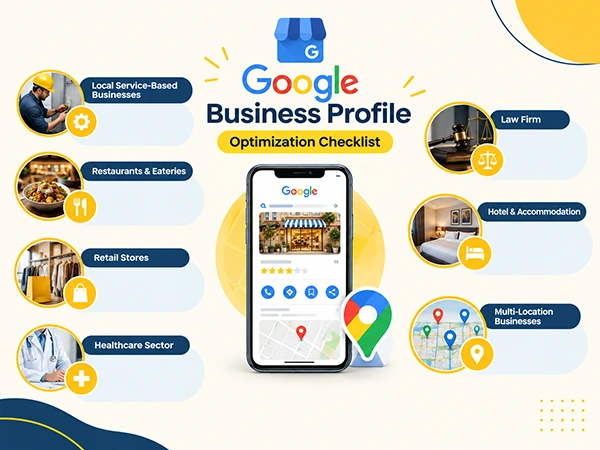
Each business has different niches and targeted markets. Hence, their GBP optimization checklist has different important elements that require particular attention. For instance.
| Business Type | Important GBP Elements to Optimize |
| Local Service-Based Businesses |
|
| Restaurants & Eateries |
|
| Retail Stores |
|
| Healthcare Sector |
|
| Law Firm |
|
| Hotel & Accommodation |
|
| Multi-Location Businesses |
|
Google Business Profile Optimization Mistakes to Avoid
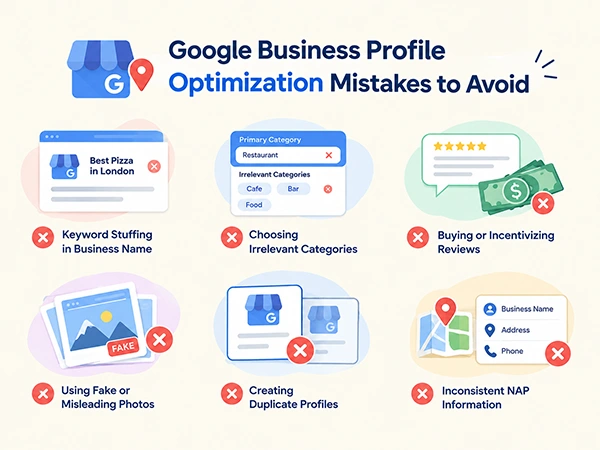
After presenting a detailed Google My Business optimization checklist, in this section we have discussed several common mistakes that businesses usually make while working on their GBP. Check them out.
1. Keyword Stuffing the Business Name
To manipulate rankings, businesses stuff their official Google Business name with keywords and search terms competitors are using, leading to it differing from the legal and registered business name.
Why it Hurts: According to Google guidelines for representing GBP, including unnecessary information in the business name is not permitted and could result in suspension of the Business Profile.
Fix: Ensure you keep the exact business name as your registered and legalized one. Do not add any keywords, city/country, or service/product name.
2. Choosing Irrelevant Categories
Picking a broad category as a primary one or adding a dozen irrelevant categories just to boost your chances of showing up in many search results.
Why it Hurts: Adding numerous categories may confuse Google’s algorithm about your core offerings, which may effectively lower your visibility and search rankings.
Fix: Try to opt for the most specific one as the primary category that defines your business offering the best and add the other relevant ones as the secondary. For example, if you own a pizza center, add “Italian Restaurant” or “Pizza Restaurant” as a primary category instead of “restaurant” or “eatery”.
3. Buying or Incentivizing Reviews
Often, businesses buy or incentivize reviews for their Google Business Profile to artificially boost their online reputation, visibility, and attract more potential customers quickly.
Why it Hurts: This not only violates the official Google Business Profile guidelines but also may invite several penalties or even suspension, poorly affecting local search visibility and ranking.
Fix: Do not fake your Google reviews. Try to ask naturally for positive feedback from your customers. Google also prioritizes natural and genuine customer engagement for ranking.
4. Using Fake or Misleading Photos
Sometimes businesses use fake visual content, such as misleading photos and videos, to hide poor conditions, attract more clicks, and, most importantly, to manipulate SERP rankings.
Why it Hurts: Faking your business visuals can lead to numerous problems, like profile suspension risk, lower CTR, and loss of trust signals.
Fix: Delete all the fake or bad images from your profile immediately. Always add real, high-quality photos and videos of your business consistently to improve your Google Profile performance.
5. Creating Duplicate Profiles
Usually, businesses create a duplicate GBP while waiting for their suspension issue to resolve or just to boost their online visibility.
Why it Hurts: A duplicate Google Business Profile for the same brand often confuses both Google crawlers and visitors, leading to a loss of trust, lower search result visibility, profile suspension, and review fragmentation while weakening local SEO efforts.
Fix: If you have access to both (real and duplicate) GBPs, sign in to your GBP >> Business >> Duplicate >> look for a duplicate profile >> click the three dots >> Remove. Whereas, if you don’t have access to the duplicate one, open Google Maps >> select the duplicate listing >> select Suggest an edit >> choose Close or Remove to ask Google to shut down that profile.
6. Having Inconsistent NAP Information
Businesses generally do not pay attention while adding their business NAP (Name, Address, and Phone Number) across their different digital channels, such as websites, social media outlets, GBP, and relevant business listings/directories.
Why it Hurts: Mismatched business information confuses both search engine crawlers and visitors, destroying chances of local search visibility along with customer trust.
Fix: With the help of a local SEO checklist, try to maintain consistent business information across all your digital handles. Remove/delete the outdated phone numbers, fix broken links/landing pages, and ensure you have added the correct & same location all along.
How Often Should You Optimize Your Google Business Profile?
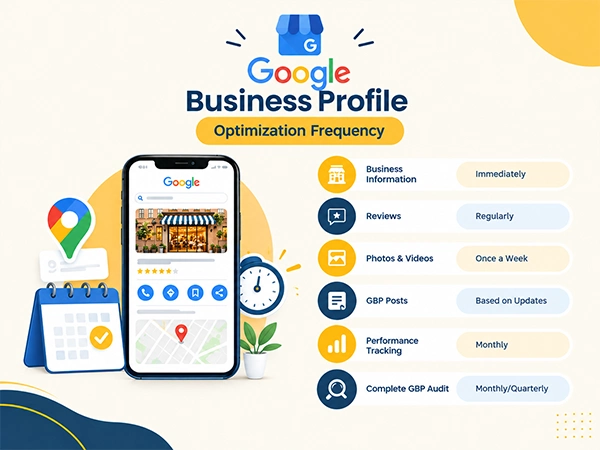
A Google Business Profile should be monitored regularly and updated whenever business information changes to keep it fresh and relevant for visitors. Although a monthly audit is a practical baseline, activities like reviews, customer questions, profile information, and important updates should be checked more frequently.
Below, we have suggested how frequently you should optimize your GBP; take a look.
| Activity | Suggested Frequency |
| Business Information | Immediately whenever you make changes. |
| Reviews | Regularly |
| Photos & Videos | Once a Week |
| Google Business Profile Posts | Based on Business Updates |
| Performance Tracking | Monthly |
| Complete GBP Audit | Monthly/Quarterly |
Remember, the above-mentioned table is our suggestion and is not Google’s official ranking requirements.
How to Check if Your Google Business Profile Is Optimized
A simple review can help you determine whether your GBP is completely optimized or not. For instance.
1. Fully Optimized
A well-optimized Google Business Profile has:
- Complete Verification
- Accurate Business NAP Information (Name, Address, and Phone Number)
- Correct Category
- Complete Services
- Strong Visual Profile (Photos & Videos)
- Genuine Customer Reviews
- Active Review Responses
- Correct Website URLs and Action Links
- No Unresolved Duplicate Issues
- Regular Performance Monitoring
2. Needs Improvements
Your Google Business Profile requires immediate attention if it has:
- Missing Business Services
- Little Visual Content (Photos & Videos)
- Incomplete Business Information
- Unanswered Reviews
- Incorrect Operating Hours
- Added Wrong Category
- Poor Customer Information
- Broken Links
- Unresolved Duplicate Business Profiles/Listings
- Irregular Updates or Performance Monitoring
Does Google Business Profile Optimization Improve Local SEO?
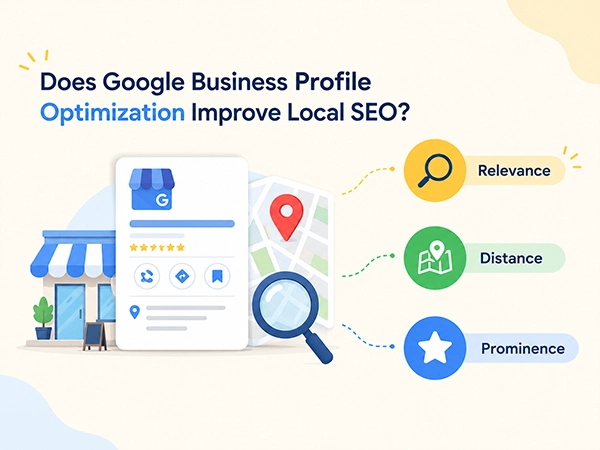
Definitely, an accurate and complete GBP can support strong local search visibility, but remember optimization does not guarantee a specific ranking position.
According to Google, local results are mainly based on three important factors:
- Relevance: Refers to how well your business matches the user’s search query. A complete and detailed GBP helps Google understand the business and match it to relevant searches.
- Distance: Refers to how far your business is from a person who is searching for your product/service or the location specified in the search query.
- Prominence: Refers to how well-known your business is. Google considers factors such as reviews, ratings, links from other websites, and overall online presence when determining a business’s prominence in local search.
Briefly, if you are someone who wants to expand your business in the digital sphere, we recommend that you invest in local SEO services.
Google Business Profile Optimization Checklist — Quick Version
Summarizing the entire blog post, in this section we present a simple, copy-paste Google Business Profile checklist you can easily use next time you audit your business profile listing.
✅Claim and Verify Profile
✅Use Accurate Business Name
✅Select Correct Primary Category
✅Add Relevant Secondary Categories
✅Verify Address/Service Area
✅Add Phone Number
✅Add Website
✅Set Business Hours
✅Write Business Description
✅Add Services/Products
✅Add Attributes
✅Upload Logo
✅Add Cover Photo
✅Upload Business Photos
✅Add Videos
✅Request Genuine Reviews
✅Regularly Respond to Reviews
✅Publish Relevant Updates
✅Add Booking/Action Links
✅Check Social Links
✅Maintain NAP Consistency
✅Check Duplicates
✅Monitor Profile Changes
✅Review Performance Data
✅Audit Profile Regularly
Final Takeaway
In a nutshell, Google Business Profile optimization is not about filling every available field with keywords. It is about providing accurate, up-to-date, and complete information about your business, maintaining genuine customer engagement while regularly monitoring how visitors are interacting with your profile.
Accordingly, an optimized Google Business Profile helps you manage how your brand appears in local search results and Google Maps, helping you attract maximum nearby customers who are ready to make a purchase. So, now that you have a Google Business Profile optimization checklist on hand, it’s time to put it into action; follow the full set of instructions carefully to update.
Frequently Asked Questions
What is Google Business Profile optimization?
Google Business Profile optimization is the process of updating, completing, and improving your free Google business listing, managing how your brand appears on Google Search Results and Google Maps.
How do I optimize my Google Business Profile?
To optimize your GBP, you can perform several steps, including claiming & verifying, selecting the right categories, refining business information, writing an accurate & relevant description, adding visuals, managing reviews, and regularly updating the changes.
What are the most important Google Business Profile ranking factors?
According to Google, local results are primarily based on three different factors, such as relevance, distance, and prominence.
How often should I update my Google Business Profile?
To keep your GBP fresh and relevant for user search intent, you must update your profile once a monthly/quartely by adding new photos or videos, reviewing customer reviews, and improving other details. Also, if you are changing your operating hours or service/product options, ensure you make immediate changes in your GBP.
Do Google Business Profile posts improve rankings?
GBP posts are not a direct Google ranking factor. However, they can help businesses share timely updates, offers, latest changes, and user information with customers through their Google Business Profile.
How many photos should I add to my Google Business Profile?
According to Google, there is no defined number of photos required for GBP. However, Google recommends adding at least three pictures of each category, such as exterior, interior, product/service, and team.
Do Google reviews help local SEO?
Yes, Google reviews are one of the factors associated with prominence that Google’s search engine uses to determine which businesses should appear on the Google Map pack.
Can I add keywords to my Google Business Profile name?
You should not add any keywords to your GBP name unless it’s a part of your actual, legally registered business name. Make sure you keep the same name as your storefront to prevent any sorts of Google verification issues.
What should I do if my Google Business Profile is suspended?
If your GBP is suspended, try to identify and fix all sorts of issues according to the guidelines and GBP optimization checklist. After that, you must file an appeal using the official Google Business Profile tool, but remember not to create a duplicate profile while waiting.
How do I know whether my Google Business Profile is performing well?
Open your built-in Performance dashboard on Google Search or Maps and track visibility and key engagement metrics to determine whether your Google Business Profile is performing well or not.