

- What Is an SEO Reporting Dashboard?
- Why Monthly SEO Reporting Matters
- What to Include in a Monthly SEO Dashboard (Section by Section)
- Best Tools to Build Your SEO Reporting Dashboard
- Free SEO Reporting Dashboard Layout (Sample)
- Common Mistakes in Monthly SEO Reporting
- How Often to Update the SEO Dashboard
- Conclusion
- Frequently Asked Questions

A good SEO reporting dashboard brings together your essential SEO metrics. These may include organic traffic, keyword rankings, leads, technical health, backlinks, and AI visibility. A well-structured monthly SEO report helps you understand how your website performs in search results and identify issues early to make data-driven decisions to improve rankings and conversions.
Whether you manage SEO in-house or report to clients, tailor your dashboard to your website type. Track local rankings for local businesses, product performance for e-commerce sites, and leads and conversions for lead-generation websites. If you want expert help turning these reports into real growth, our SEO agency in Delhi can help you track the right metrics and improve your organic results.
This guide covers a complete checklist of what to include in your monthly SEO report, along with a practical dashboard template idea, common mistakes to avoid, and how often you should update your SEO dashboard.
What Is an SEO Reporting Dashboard?
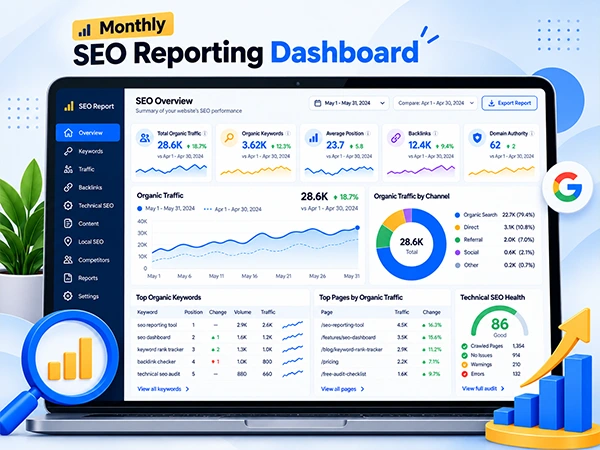
An SEO reporting dashboard is a visual interface that displays real-time key performance indicators (KPIs) and other essential website performance metrics from multiple sources, such as Google Analytics and Google Search Console, collectively.
Unlike a monthly SEO report, which summarizes website performance in organic search over 30 days, an SEO reporting dashboard provides ongoing views of SEO metrics. For example, the dashboard helps monitor real-time performance and identify trends, while the monthly SEO report presents a summary of key changes, results, and insights from the reporting period.
Here’s an example of what an SEO reporting dashboard looks like:
Why Monthly SEO Reporting Matters
A monthly SEO report helps businesses evaluate the effectiveness of their implemented SEO strategies, measure ongoing progress, and identify potential areas that require improvement. Alongside this, it provides essential insights like organic traffic, keyword rankings, conversions, and other SEO KPIs to support data-driven decisions.
Additionally, here are some crucial reasons why a monthly SEO report matters:
- Measure ROI: You can track how your SEO efforts contribute to organic traffic, leads, conversions, and other business goals.
- Identify Performance Drops: An SEO reporting dashboard highlights declining traffic, lost keyword rankings, and technical issues that need immediate attention.
- Keep Teams Aligned: Helps prepare an SEO report for clients and the team to review progress, understand results, and stay focused on shared goals.
- Guides Next Month’s Plan: Uses monthly performance data to prioritize improvements and plan the next month’s SEO activities with data-driven strategies.
What to Include in a Monthly SEO Dashboard (Section by Section)
A monthly SEO reporting dashboard should present all the most important SEO metrics in one place, helping businesses evaluate performance, identify opportunities, and plan improvements.
Thus, to prepare a comprehensive monthly SEO report, you can include the following sections.
1. Executive Summary
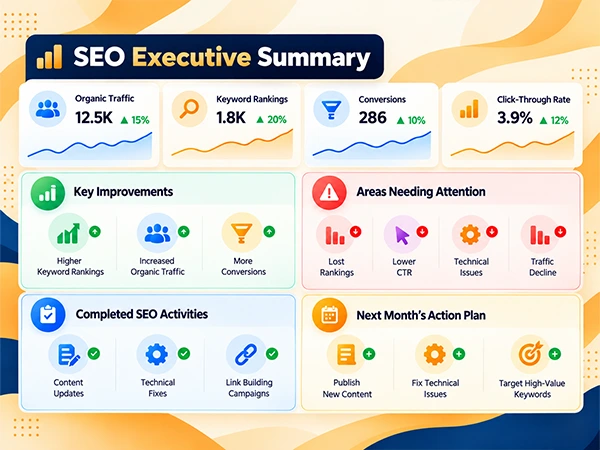
Start your SEO report for clients with a brief overview of the website’s monthly performance. For instance, you can add a quick summary like: “Organic traffic increased 15% this month with improvements in keyword rankings.” “Conversions grew by 10%, indicating better engagement from organic visitors”.
Remember, an executive summary should appear at the top of the dashboard so clients and stakeholders can easily understand the most important results without spending time analyzing each metric.
What to Include:
- Highlight key improvements, such as better keyword rankings, increased organic traffic, and more conversions.
- Identify significant lost rankings, reduced click-through rates, technical issues, and declines in traffic that require immediate attention.
- Outline the completed SEO activities, including content updates, technical fixes, and successful link-building campaigns.
- Summarize the most important action planned for the upcoming month based on the current performance data.
2. Organic Traffic
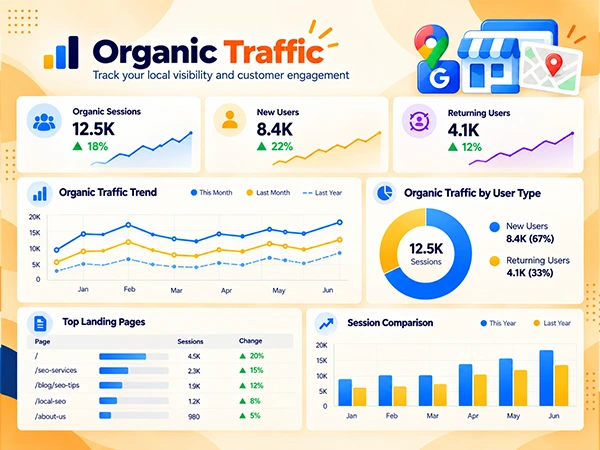
Organic traffic is one of the most important SEO metrics to track in monthly reports. So, make a section dedicated to organic sessions, including new users, returning visitors, and top-performing landing pages. Also, always compare month-over-month (MoM) and year-over-year (YoY) data to determine traffic trends and opportunities for increased organic visibility, especially for seasonal business.
What to Include:
- Track the number of visits from organic search. Compare sessions across reporting periods to identify traffic growth or decline.
- Highlight the number of users who have visited through organic search, using Google Analytics 4.
- Show whether organic search attracts new visitors and brings previous visitors back.
- Outline pages receiving the most organic traffic and evaluate which content or landing page drives increased visitors effectively.
- Present a comparison with the previous month and the same month last year to clarify the short-term changes and longer-term trends.
3. Keyword Rankings
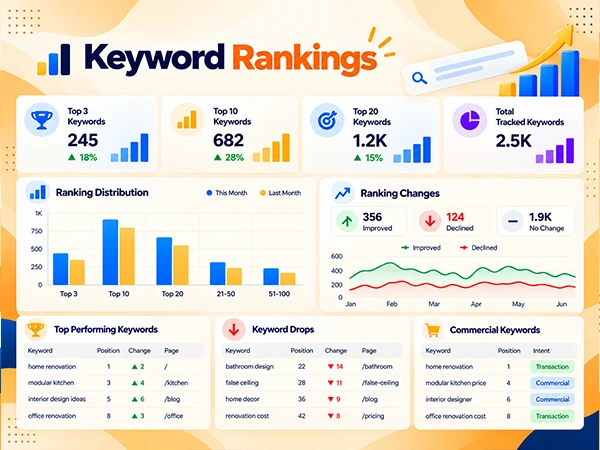
Keyword rankings show where your website appears in SERP for specific search queries. Instead of listing every keyword position, a monthly SEO report should focus on keywords ranking in the top 3 and top 10, and significant ranking gains or drops.
Besides, group used keywords by page type or search intent to identify which pages perform well and which need optimization.
Bonus Tip: You can use any rank-tracking tool, such as Semrush, Ahrefs, or SE Ranking, to compare keyword positions across locations, devices, and reporting periods.
What to Include:
- Mention how many target keywords are ranking in the top three, ten, or twenty organic positions, providing strong search visibility.
- Highlight keywords that have improved or lost positions since the previous reporting period.
- Outline keywords that are commercially important or closely related to lead generation or sales.
- Identify keywords for which the ranking page is not performing well or can’t satisfy users’ informational, commercial, or transactional needs.
4. Search Console Data
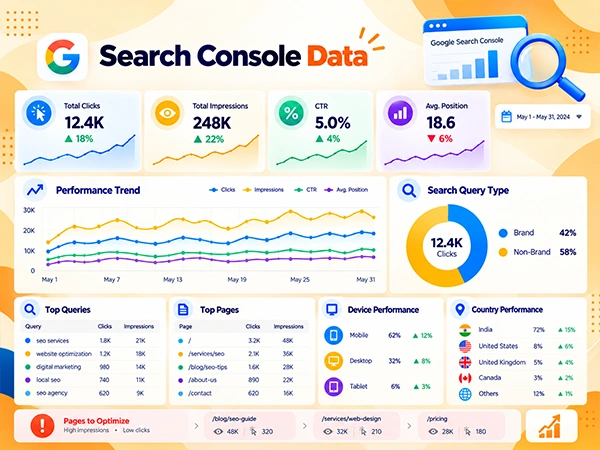
Your monthly SEO report should prioritize Google Search Console data, as it covers essential SEO KPIs and shows how your website performs in Google search. So, use the Performance report to track clicks, impressions, CTR, and average positions.
Alongside, compare date ranges (such as a 28-day window or a matching calendar month with weekday alignment) to identify changes and queries, or flag pages with high impressions but low clicks for optimization.
What to Include:
- Cover how many clicks the website receives from Google Search results to assess whether your organic visibility is translating into visits.
- Mention how often the website link appears in Google Search results. Show whether impressions increased or decreased.
- Calculate the percentage of impressions that generate clicks.
- Identify and outline pages that appear frequently in search results but attract relatively few clicks.
- Clearly mention queries, top pages, device performance, and even country performance (if relevant).
- Differentiate brand and non-brand queries to understand how much traffic comes from branded searches versus generic keywords.
5. Leads and Conversions
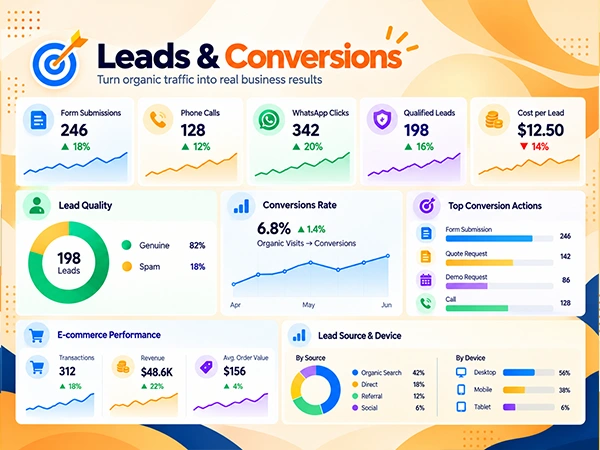
Leads and conversions demonstrate how effectively the website’s organic traffic contributes to your business objectives. Therefore, this section is especially for service-based businesses that significantly rely on enquiries, purchases, bookings, or other measurable actions.
What to Include:
- Track contact forms, quote requests, demo requests, and other lead-generation actions that are completed by organic visitors.
- Assess lead quality by separating genuine leads from spam and calculate the cost per lead using relevant SEO expenses.
- Measure calls generated through call-tracking systems or phone links.
- Track clicks on WhatsApp contact links to understand how often organic visitors initiate conversations.
- For e-commerce websites, outline transactions, revenue, average order value, and other relevant commercial SEO KPIs.
- Measure the proportion of organic visits or users that complete a defined conversion by tracking key events in GA4. To set them up, you have to mark relevant events, such as form submissions or purchases, as key events in GA4 admin.
6. Technical Health
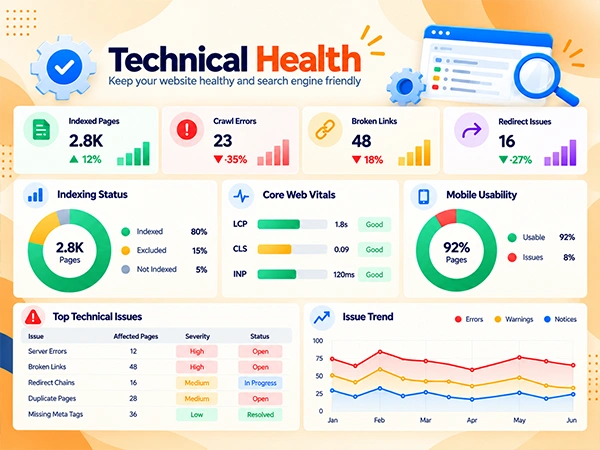
According to Google’s guide, technical SEO directly helps search engines discover, crawl, render, and index important pages of your website. However, technical issues can effectively restrict organic visibility even when the content itself is valuable, making it one of the important metrics to present in the SEO report for clients.
What to Include:
- Mention important pages/URLs that are properly indexed by Google. Also, cover unexpected indexing losses or valuable pages that are excluded from search results.
- Highlight server errors, broken URLs, redirect problems, and other issues that prevent search engines from accessing important content on your website.
- Based on the Google Search Console blog, cover three Core Web Vitals factors, including Largest Contentful Paint (LCP), Cumulative Layout Shift (CLS), and Interaction to Next Paint (INP).
- Mention pages that do and do not provide a functional mobile experience, including accessible navigation, readable text, and usable interactive elements.
- Outline broken links, redirect chains, and unnecessary redirects that can affect usability and crawl efficiency.
- Record the severity, status, and resolution date of each important issue for technical action tracking.
7. Backlinks and Off-Page SEO
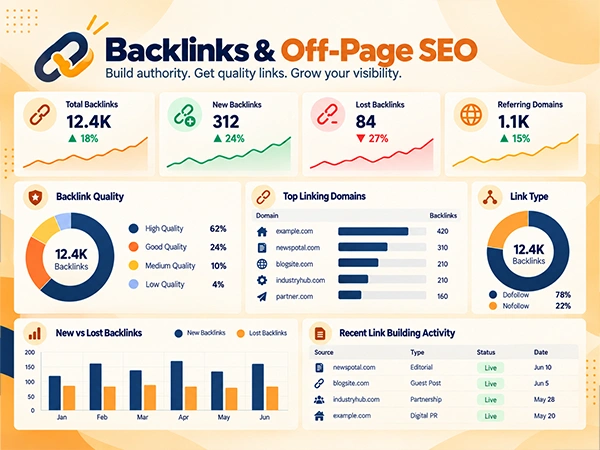
According to official Google Search Central documentation, Google uses links as a primary signal to determine the relevancy of pages and as a mechanism to discover and crawl new web pages. Therefore, a monthly dashboard should assess backlink quality and context, not just quantity.
What to Include:
- Mention newly discovered links to comprehend whether they come from relevant, trustworthy websites.
- Covers all the lost backlinks in depth to determine whether the link was changed or removed.
- Highlights the number of unique referring domains linking to your website.
- Reviews and indicates the link quality, topical relevance, placement, and credibility of linking pages rather than solely relying on third-party authority scores.
- Report essential link-building outcomes, such as successful digital PR campaigns, relevant editorial mentions, partnerships, and other legitimate link acquisition activities.
8. Content Performance
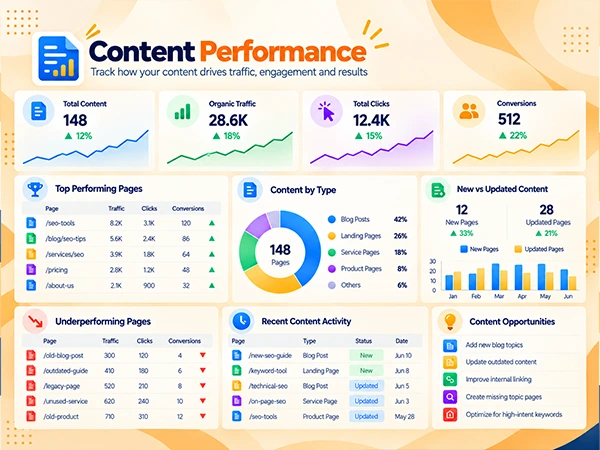
Google’s documentation, such as Google Search Essentials and the Google Search Console blog, indicates content is the primary vehicle used by search engine systems to match user intent and deliver valuable results. Hence, content performance has to be part of the SEO monthly reporting.
Examining content performance reporting identifies which pages attract search traffic, contribute to conversions, and satisfy user needs. Besides, these SEO KPIs help the team decide what outdated pages to update, merge overlapping content, and remove pages with little value or traffic.
What to Include:
- Cover newly published blogs, landing pages, product pages, and other SEO-focused content.
- Mention pages generating strong organic traffic, clicks, engagement, leads, sales, and what makes these pages effective.
- Outline pages that are experiencing declining clicks, impressions, rankings, or conversions. Add content with information that is outdated, incomplete, or no longer aligned with the targeted user’s search intent.
- Report important updates to existing content, including revised information, stronger internal links, improved headings, and better alignment with relevant search queries.
- Mention useful topics or search intents that competitors address but your website does not cover.
9. Local SEO Metrics
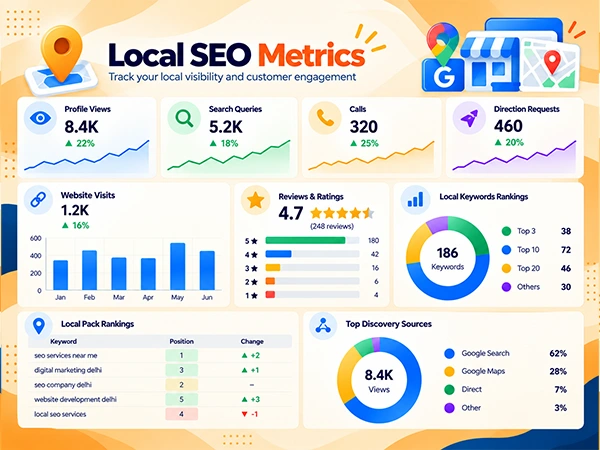
Local SEO reporting is specifically useful for businesses that serve customers in specific cities, regions, or physical locations. Mentioning local SEO metrics in an SEO report for clients helps measure visibility in local search results and engagement with the business’s local listing.
What to Include:
- Accurately mention calls reported by Google Business Profile or a compatible tracking system, noting the source and measurement limitations.
- Record local customer interest by monitoring requests for directions to a physical business location.
- Mention visits that are initiated through the Google Business Profile website link (where relevant).
- Outline new reviews, average ratings, response activity, and recurring customer feedback.
- Mention how often and for what local keywords your website is appearing in local search results.
- Track local pack rankings to monitor your business’s position in local search results for relevant local keywords.
- Record your business’s Google Business Profile views and searches to comprehend how often visitors have discovered your business through Google Maps or Google Search.
Point to Remember: Add a local SEO metrics section only for local businesses that operate in a specific area.
10. AI Visibility (AEO and GEO)
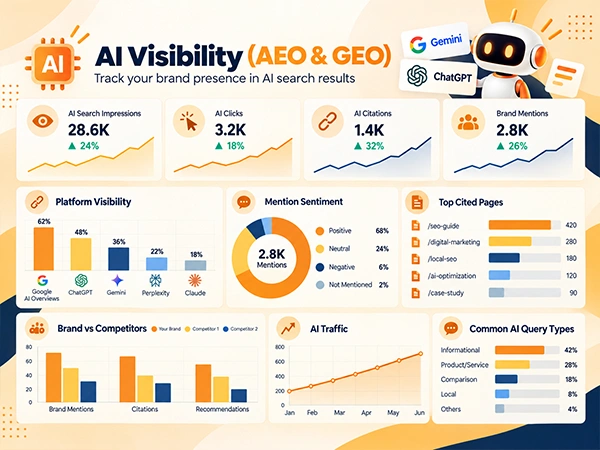
AI visibility reporting helps you understand how your website appears in AI-powered search results. Available since August 31, 2026, Google Search Console now provides dedicated generative AI performance reports worldwide, including AI Overviews and AI Mode.
These insights are relevant to Answer Engine Optimization (AEO), which focuses on structuring content to provide direct answers to users’ queries. Also, Generative Engine Optimization (GEO), which aims to improve your brand’s visibility, mentions, and citations in AI-generated responses.
What to Include:
- Mention how often your website appears in supported Google AI search features.
- Track the types of questions ChatGPT answers by mentioning your brand, recommending your product, or citing your published content.
- Outline how often Gemini mentions your brand, recommends your offerings, or references your website content.
- Identify which website pages, articles, and resources AI platforms are citing or linking to in their responses.
- Compare your brand mentions, citations, and recommendations with those of competitors across the same test prompts.
- Assess whether AI platforms describe your business positively, neutrally, or negatively in relevant responses.
- Track identifiable visits and conversions from AI platforms in Google Analytics 4 for a better understanding of their contribution to website engagement and business outcomes.
11. Action Plan for Next Month
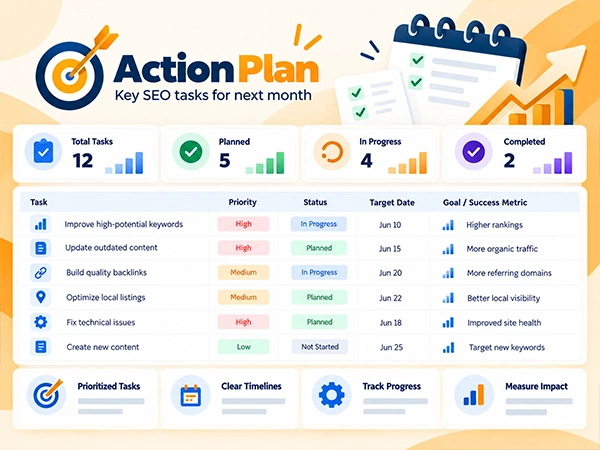
Lastly, your monthly SEO report should end with the action plan that strategically converts all the dashboard findings into specific tasks. Without this section, your report may describe website performance but evidently lacks how the team intends to work on the fixes.
What to Include:
- Mention important tactics based on business impact, urgency, effort, and the evidence from the current reporting period.
- Highlight clear completion dates so progress can be reviewed in the next reporting cycle.
- Label every task as planned, in progress, complete, or blocked for a better understanding of implemented SEO efforts.
- Specify how the team will evaluate each task. For example, define how success will be measured, what will be the primary goal for next month, and what conditions must be met for a task to be considered complete.
Best Tools to Build Your SEO Reporting Dashboard
Choosing the right SEO reporting tools helps you collect performance data, monitor keyword rankings, analyze backlinks, and create easy-to-understand reports. However, the best combination depends on different factors, such as reporting requirements, budget, and the SEO metrics to track.
Below, we have mentioned some SEO reporting tools for you; take an attentive look to find what suits you best.
| SEO Reporting Tools | What it Tracks | Pricing |
| Google Analytics 4 (GA4) |
| Free; Paid Enterprise Options Available |
| Google Search Console |
| Completely Free |
| Looker Studio SEO Dashboard |
| Free for the Standard Version; Third-Party Connectors May Cost Extra. |
| Semrush |
| Free Trial; SEO Plan at $139.95/mo (as of Oct 2026) |
| Ahrefs |
| Free Account: Available with limited features; Lite Plan at $129/mon (as of Oct 2026) |
Free SEO Reporting Dashboard Layout (Sample)
An effective SEO dashboard template layout typically presents the most important performance metrics in a single view, making it easier to monitor website progress while identifying areas for improvement. For instance, you can create a free SEO dashboard template in Looker Studio SEO dashboard by following these steps:
- Open Looker Studio and select a free SEO dashboard template.
- Add Google Analytics as a data source and select your GA4 property.
- Also, add Google Search Console as another data source and select your website properly.
- Customize the dashboard with relevant metrics.
- Save and share the dashboard to monitor SEO performance.
Besides, below we have presented an SEO dashboard layout, highlighting which dashboard blocks, performance metrics, and recommended charts you must include. Take a quick look.
| S. No. | Dashboard Block | SEO KPIs | Chart Type | Purpose |
| 1. | Executive Summary | Organic Traffic Growth, Keyword Ranking, Conversion, Content Performance, & Key Achievements | KPI Cards / Scorecards | Provides a quick overview SEO report for clients. |
| 2. | Organic Traffic | Sessions, Users & New vs. Returning Users | Line Chart | To showcase website performance over time and traffic trends. |
| 3. | Keyword Rankings | Ranking gains and drops, & Top 3 and Top 10 ranking keyword positions. | Table | Highlights keyword ranking opportunities, improvements, and drops. |
| 4. | Search Performance | Clicks, Impressions, CTR, & Average Position | KPI Cards & Line Chart | Measure click performance and organic search visibility. |
| 5. | Leads and Conversions | Form Submissions, Calls, WhatsApp Clicks, & Conversion Rate | Bar Chart and KPI | Allows monitoring SEO performance with achieved business outcomes. |
| 6. | Technical SEO Health | Indexed Pages, Crawl Errors, Core Web Vitals, Mobile Issues, & Noindex/Broken-Link Checks | Issue Table and Status Cards | Outlines all technical problems that require immediate attention. |
| 7. | Backlink Performance & Off-Page | New Backlinks, Lost Backlinks, & Referring Domains | KPI Cards and Trend Chart | Tracks changes in the link profile and backlink growth. |
| 8. | Content Performance | Top Blogs, Newly Published Pages, & Content Needing Updates | Table | Highlights which content is performing well and which landing pages need improvements. |
| 9. | Local SEO Metrics | Google Business Profile Views, Calls, Direction Requests, Local Keyword Rankings, and Local Search Visibility | KPI Cards or Trend Chart | Helps to track local search performance and measures engagement with your business profile. |
| 10. | AI Visibility | AI Mentions, Brand Citations, AI Referral Traffic, and Share of Voice in AI Search | KPI Cards | Monitors brand visibility across AI-powered search platforms and identifies opportunities to improve AI search presence. |
| 11. | Next Month’s Action Plan | Deadlines Status, Priority Tasks, and Data-Driven Strategies | Task-Tracking Table | Helps to turn reporting insights into actionable SEO tasks. |
Common Mistakes in Monthly SEO Reporting
Remember, your monthly SEO report for clients should do more than present numbers and charts. The report should accurately and concisely present the important data, highlight areas that need improvement, and show how SEO activities contribute to your primary business goals.
Here are some common mistakes to avoid when creating SEO reports for clients, to make performance easy to understand and support informed decisions.
1. Focusing Too Much on Vanity Metrics
SEO KPIs such as total number of impressions, page views, and keyword ranking surely indicate SEO progress, but they do not reflect business success. For instance, a site can gain 20,000 new monthly visitors through low-intent blog posts while generating zero revenue.
The Fix: Connect your SEO metrics directly with your business outcomes. Focus on commercial KPIs, such as cost per acquisition (CPA), organic revenue, and conversion rates by intent group.
2. Presenting Data Without Insights
Presenting raw data, screenshots of tools, or an automated dashboard without adding any context won’t explain why your performance changed. For example, a graph or KPI chart that shows a sudden dip or spike means nothing unless you explain why it happened to your clients.
The Fix: Do not present statistics alone; always include written context and an executive summary. For every major data shift, add a brief note explaining the responsible factors while outlining a clear action plan for the next month.
3. Not Including a Comparison Period
Showing numbers in isolation (e.g., “We generated 500 organic clicks in October-November 2026”). Without context, previous metrics, or comparisons, your client won’t know whether this number represents a win, a loss, or stagnation.
The Fix: Always use Month-over-Month (MoM) comparisons to show immediate improvements by comparing current performance with a previous timeframe and metrics. Also, if you want to show long-term SEO growth or deal with a seasonal business, add a dedicated Year-over-Year (YoY) section.
4. Ignoring Leads and Conversions
Focusing your monthly SEO report only on top-of-the- funnel metrics (e.g., “Can people find us?”) rather than tracking the major concern (“Are visitors buying from us?”). Mentioning the traffic number definitely shows how your SEO strategies are working, but it may lack true conversion insights.
The Fix: Track your leads and conversions thoroughly using platforms like Google Analytics (GA4). Clearly mention form submissions, phone calls, demo sign-ups, and actual digital sales in your report so you can prove the exact return on investment.
5. Creating Reports That Are Too Long
Developing a monthly SEO report with a massive 30-page slide deck or an overcomplicated dashboard with technical errors or excessive technical details can overwhelm clients and make key performance insights difficult to understand. Executives do not have the time to examine numerous pages just to find the key achievements, improvements, or a data-driven action plan for next month.
The Fix: Always try to keep your SEO report streamlined and tailored for your clients. For example, aim to create concise 2–3-page reports, where on the first page you mention a brief overview, with revenue/conversion data on page two. Likewise, present technical wins and the next month’s plan on page three.
How Often to Update the SEO Dashboard
An SEO reporting dashboard should be updated frequently to properly track your SEO performance, identify issues, and make data-driven decisions. While some metrics can be tracked daily, weekly reviews help identify trends, while monthly reports measure overall progress. Similarly, quarterly audits uncover deeper technical issues and further long-term improvement opportunities.
Below, we have presented which SEO KPIs you must update daily, weekly, monthly, or quarterly. Check them out.
- Daily: Monitor organic traffic, search clicks, content, conversions, and indexing issues that require immediate action.
- Weekly: Review traffic trends, CTR, keyword rankings, and landing-page performance.
- Monthly: Prepare a month-over-month (MoM) comparison of KPIs with the previous period to analyze conversions. Thoroughly highlight progress and areas that need improvement.
- Quarterly: Every three months, conduct a broader SEO audit, covering technical health, content gaps, backlinks, and long-term strategy.
Point to Remember: Daily traffic and conversion monitoring is a recommendation, not a universal requirement. Remember, your update frequency depends on website size, traffic volume, campaign objectives, business risks, and reporting needs. Daily checks are useful when rapid detection of significant problems matters.
Conclusion
In a nutshell, an SEO reporting dashboard brings essential SEO metrics, including organic traffic, keyword rankings, backlinks, and conversions, into one place. It helps you track performance, identify ranking drops, and precisely measure the impact of your SEO efforts.
By reviewing these insights regularly, you can understand what is working, identify areas for improvement, and make informed decisions to refine your SEO strategy. A well-structured dashboard also simplifies reporting, saves time, and keeps your SEO goals aligned with your business. Additionally, explore our SEO services to strengthen your website’s search performance and drive sustainable organic growth for your business.
Frequently Asked Questions
What should be in a monthly SEO report?
Your monthly SEO report should connect search performance directly with your business growth. Thus, mention the core sections:
- Executive Summary
- Organic Traffic
- Keyword Rankings
- Search Console Data
- Leads and Conversions
- Technical Health
- Backlinks and Off-Page SEO
- Content Performance
- Local SEO Metrics
- AI Visibility (AEO and GEO)
- Action Plan for Next Month
Which SEO metrics matter most?
The most important SEO KPIs to include in your reporting dashboard are:
- Traffic Metrics: Organic Traffic, Conversions, and CTR
- Visibility & Ranking: Keyword Ranking, Search Visibility, and AI & Answer Engine Visibility
- Authority & Technical Health: Referring Domains, Core Web Vitals, and Index Coverage & Site Health
How often should you update an SEO dashboard?
Update your SEO dashboard daily to monitor important SEO KPIs like traffic and indexing, weekly to review keyword rankings and CTR, and monthly to compare conversions and KPIs with the previous timeframe. Also, conduct a thorough quarterly audit to determine technical health, content gaps, backlinks, and long-term SEO strategy.
How do you track AI Overview visibility?
To track AI Overview visibility, you can use Google Search Console’s generative AI performance report. It provides impression data for supported Google AI features, including AI Overviews and AI Mode. However, the platform does not track mentions across other external AI platforms.
What are the four different types of SEO dashboards?
Strategic, operational, analytical, and tactical are the four main types of dashboards. For instance, strategic dashboards help track long-term goals, operational dashboards monitor daily activities, analytical dashboards identify trends in historical data, and tactical dashboards measure short-to-medium-term progress.