

- First, Check If Google Has Indexed Your Page
- Why Your Website May Not Be Ranking on Google
- Why Did My Google Rankings Suddenly Drop?
- Why Am I Ranking on Page 2 but Not Page 1?
- How to Diagnose Why Your Website Is Not Ranking
- How to Fix a Website That Is Not Ranking on Google
- How Long Does It Take to Rank on Google?
- Conclusion
- Frequently Asked Questions
Having a website or publishing content daily does not automatically guarantee higher visibility on Google. So, if you are wondering, “Why am I not ranking on Google?” the problem may be caused by non-indexed pages, poor technical SEO, low-quality content, mismatching search intent, or weak website authority.
Before making SEO changes, it is important to identify what is actually preventing your pages from performing. Ahrefs reports state that more than 96.98% of Google clicks go to the top 10 search results, highlighting how important first-page visibility is. The cause can be anything: maybe your website/page is not indexed, the page is indexed but not ranking, the page ranks but is stuck beyond page one, or rankings have dropped. Each situation requires a different solution, and if you need help addressing these issues, you can also explore professional SEO services.
Therefore, in this guide, we have explained 12 potential reasons why your website is not ranking on Google, along with troubleshooting and other essential factors. So, without further ado, let’s begin!
First, Check If Google Has Indexed Your Page
Indexing is the process by which search engines like Google store and organize your website content in their database. If your page isn’t in the search engine database, online users won’t be able to see your content. So, before anything, you must check whether Google has indexed your website’s page or not.
For this, you can do several things, such as:
- Use Google Search Console (URL Inspection Tool): Enter your page URL to check its indexing status and identify any potential issues preventing it from appearing in search results.
- Check Google Search Console (Page Indexing Report): Review indexed and excluded pages along with the reasons why certain pages have not been indexed.
- Use a site: Search: Perform a Google search using site:yourdomain.com to quickly check whether a specific page appears in Google’s index. Remember, this is only a quick check and should not replace Google Search Console for confirming indexing status.
- Look for the Noindex Tags: Check your page’s meta robots tag and HTTP headers to ensure a noindex directive isn’t preventing Google from indexing the page.
- Check robots.txt restrictions: Make sure your robots.txt file isn’t blocking Google from crawling important pages you want to rank.
- Check the XML sitemap: Ensure all your important URLs are precisely included in the XML sitemap and that it is submitted correctly in Google Search Console.
- Check crawl errors and server issues: Identify and fix server errors, redirect issues, or other technical problems that may prevent search engines from accessing your page.
- Use any third-party SEO crawlers & checkers: Make use of SEO crawling tools to identify indexing, crawlability, and other technical issues across your website.
Important Point: Page indexing is the baseline requirement for ranking. Your page may have high-quality content and be well-optimized, but it has no chance of ranking without being indexed. Being indexed, however, does not guarantee first-page ranking on Google.
Why Your Website May Not Be Ranking on Google
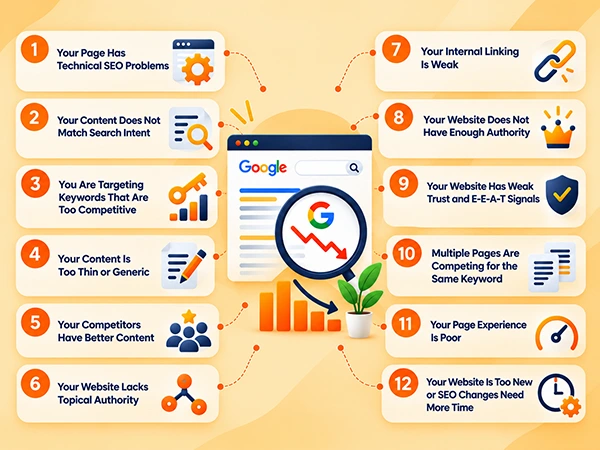
From technical issues, content mismatch with search intent, targeting the wrong keywords, and lack of topical authority to poor internal linking and weak trust & E-E-A-T signals, numerous reasons can negatively affect your Google ranking.
Hence, if you are wondering why is my website not ranking on Google, review this section thoroughly and determine what possible reason is behind your poor ranking and how to fix it.
1. Your Page Has Technical SEO Problems
Often, businesses overlook the technical health of their websites, which could lead to Google ranking issues. Technical errors can hurt your ranking by stopping search engine bots from finding your website, causing difficulty in crawlability and indexing.
How to Fix: Try fixing the following technical errors to ensure your website has no performance issues and both users and search engines can easily access and navigate through it.
- Crawlability: Ensure search engines can easily access and crawl your important website pages without unnecessary restrictions.
- Rendering Issues: Check that Google can properly render your web page content, including important JavaScript-based elements.
- Broken Pages and Incorrect Redirects: Fix broken URLs and ensure redirects point users and search engines to the correct pages.
- Canonical Problems: Use the correct canonical tags to help search engines identify the preferred version of similar or duplicate pages.
- Poor Mobile Usability: Make sure your website is easy to navigate and use on mobile devices with responsive, user-friendly pages.
- Slow Loading Speed: Improve page loading times by optimizing images, reducing unnecessary scripts, and improving server performance.
- Core Web Vitals: Monitor metrics such as loading performance, interactivity, and visual stability to improve the overall page experience.
If you have a complex website or are having a hard time managing it, consider opting for technical SEO services in Delhi to get professional assistance.
2. Your Content Does Not Match Search Intent
Publishing a dozen blogs won’t work! Your content must match your targeted audience’s search intent. If not, both the Google search rankings and customer engagement may potentially drop because users won’t be able to find your content at the time they need it.
How to Fix: There are four types of search intent: informational, commercial, transactional, and navigational. For example, “how to improve website speed” has an informational intent, while “buy running shoes online” shows transactional intent. Thus, ensure you craft your content around these formats to meet your users’ search intent effectively. Also:
- Compare your page with the current SERP.
- Make sure the content format matches what Google is showing.
- Avoid combining unrelated search intents on one page.
- Update your outdated content.
3. You Are Targeting Keywords That Are Too Competitive
Another reason for your website not ranking on Google might be because you are targeting broad, high-competition keywords that can’t be supported by your current domain authority.
For example, search terms like “digital marketing agency”, “local SEO services”, and “pay-per-click” are already dominated by well-established enterprises, requiring high website authority to rank.
How to Fix: To improve Google rankings, switch to long-tail, more specific phrases, like “best digital marketing agency in Delhi NCR” or “hire PPC expert in Delhi” that have low volume but easier ranking potential. Besides, focus on:
- Before targeting high-volume keywords, build strong domain authority.
- If you have a new/low domain authority website, try targeting low-volume, long-tail keywords for better ranking results.
- Check the current SERP to match its format.
- Make use of premium or free keyword research tools to identify high-intent search terms.
4. Your Content Is Too Thin or Generic
When your page offers too generic information, rephrases internet text, or fails to answer a user query, it can cause Google ranking issues. Besides, sometimes well-written and optimized content also fails Google search rankings if it doesn’t stand out.
According to Google Search Central documentation, Google’s automated ranking systems are designed to prioritize helpful, reliable, and people-first content, instead of ranking manipulative content.
How to Fix: While SEO content writing, try the below-mentioned strategies to make your blog unique, informative, and user-intent-friendly.
- Expand the depth of your content by adding clear headings,real-world examples, step-by-step instructions, and an FAQ section to broadly cover your topic.
- Include relevant statistics and cite the sources to make your content authentic.
- Instead of focusing on rankings, create useful, relevant content that satisfies search intent.
- Focus on creating original, useful content that provides genuine value to users, rather than producing mass-produced or unhelpful content.
5. Your Competitors Have Better Content
Quite unexpectedly, your competitor may be providing more valuable, authoritative, and thorough content that precisely matches user search intent, which is the reason behind why your website is not ranking on Google.
How to Fix:
- Check your competitors’ content to analyze what format they are following and the information they are including that your page misses.
- Update your content to deliver clearer and updated answers, relevant FAQs, and authentic sources for broader topic coverage.
- Instead of copying your competitors, identify the gaps that are causing the content quality issues.
- Try to follow Answer Engine Optimization/Generative Engine Optimization to increase your website’s chances in AI generative responses.
6. Your Website Lacks Topical Authority
Lacking sufficient topical authority may also cause your website to struggle to rank. If your content covers a topic only superficially, without sufficient depth or useful supporting information, competing pages with more comprehensive coverage may have a stronger chance of ranking above yours.
How to Fix:
- Create comprehensive content that addresses key questions and subtopics around your main services or subjects.
- Link your pillar pages with relevant supporting articles to build clear topic clusters and strengthen your website’s topical authority.
- Analyze the top-ranking pages and determine where your content information is lacking. Find content gaps and update your page with sections that add more value and usefulness to it.
7. Your Internal Linking Is Weak
Often businesses do not prioritize internal linking. However, weak internal linking can make it harder for Googlebot to discover, understand, and effectively rank your pages in search results.
How to Fix:
- Link your supporting articles back to the pillar/commercial page and several other related articles, so that Googlebot recognizes, crawls, and ranks your content.
- Use clear anchor text with descriptive words for your links. For example, instead of generic text “click here”, try to use terms like “local SEO strategy” for a clear understanding.
- Try to fix your orphan pages by linking them with the pages that are currently receiving high traffic.
8. Your Website Does Not Have Enough Authority
Usually, a website also lacks ranking power when Google sees it as untrusted or lacking authority compared to competing ones in the same niches as yours. Hence, website authority is crucial.
How to Fix: Build your website’s authority through relevant backlinks, genuine brand mentions, and digital PR.
- Earn relevant, high-quality backlinks from reputable websites in your industry.
- Build genuine brand mentions through industry publications, online communities, partnerships, and other relevant platforms to increase your brand’s visibility and recognition.
- Use digital PR to promote valuable content, original research, expert insights, or newsworthy stories that help you earn media coverage and authoritative backlinks.
9. Your Website Has Weak Trust and E-E-A-T Signals
If your website lacks clear E-E-A-T (Experience, Expertise, Authoritativeness, and Trustworthiness) signals, Google may be hesitant to recommend your content, resulting in poor website ranking.
How to Fix:
- Always add original data, real customer case studies, product tests, research work, and personal insights to your content. Avoid unverified claims or facts.
- Publish your privacy policies, physical address, customer service contacts, and authentic client testimonials.
- Create author profiles for your website, featuring their expertise, professional backgrounds, certifications, and social profiles (like LinkedIn).
10. Multiple Pages Are Competing for the Same Keyword
When you create multiple pages on a website competing for the same keywords, it causes a problem called keyword cannibalization. It makes Google confused about which page it should prioritize and rank, splitting ranking power and lowering position on the SERP.
How to Fix:
- At first, try to merge the best and most useful information from all your competing URLs into one single, comprehensive page, delivering useful, broad topical coverage.
- Use 301 redirects when you permanently consolidate competing pages into one URL. If a page still needs to remain accessible to users but should not appear in search results, use a noindex directive instead.
- If the pages have to be different, try to shift the search intent focus of each using unique long-tail keywords.
- Direct your internal links only towards the primary page that you want to rank in the search results.
11. Your Page Experience Is Poor
Another possible reason behind your concern, “Why am I not ranking on Google?” is that your page may provide a poor user experience. If visitors struggle to navigate your website, find the information they need, or interact with your pages, it can negatively affect their overall experience.
How to Fix:
- Ensure your website is easy to navigate with a clear structure, intuitive menus, and descriptive internal links.
- Improve page loading speed and ensure your pages work smoothly across desktop and mobile devices.
- Avoid intrusive elements, such as excessive pop-ups or interstitials, that can disrupt the user experience.
- Use clear headings, readable content, and a well-organized page layout to help visitors find and understand information easily.
12. Your Website Is Too New or SEO Changes Need More Time
Generally, your new website or recent changes may not rank yet because Googlebot needs time to discover, crawl, and trust your pages to recommend them.
Although there is no fixed timeframe for how long Google takes to rank your pages, the timeline can vary significantly depending on factors such as your website’s age, competition, content quality, and SEO efforts. Additionally, consistent SEO efforts can take several months to produce meaningful improvements in ranking.
How to Fix:
- Register your website on Google Search Console to monitor how Google is currently viewing your pages.
- Submit your XML sitemap in Search Console so Google can recognize your pages quickly.
- Make use of the URL Inspection tool and manually ask Google to crawl your primary pages.
- Ensure your site does not have any robots.txt tags that are blocking search engines from crawling.
Why Did My Google Rankings Suddenly Drop?
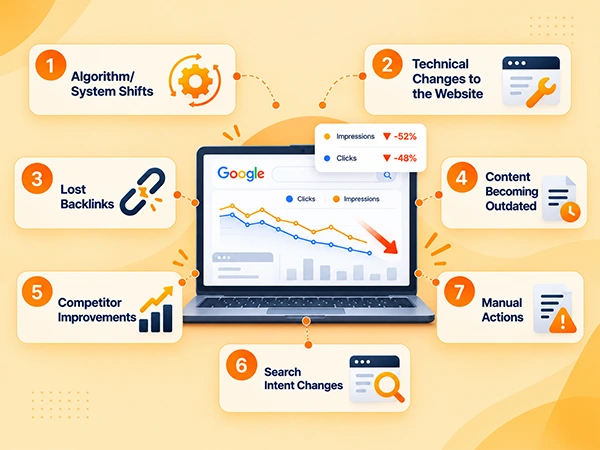
There is no single reason behind the sudden drop in your Google search rankings. It can be due to different situations, such as:
- Algorithm/System Shifts: Google updates can affect your rankings. Check the Performance report in Google Search Console for sudden changes in clicks and impressions.
- Technical Changes to the Website: Often, website changes can cause crawling or indexing issues. Check the Page Indexing and Core Web Vitals reports to determine if there are any new issues.
- Lost Backlinks: Losing valuable backlinks can potentially weaken your page’s authority. Use a backlink analysis tool to identify lost or broken links.
- Content Becoming Outdated: Outdated factual or informative content may become less relevant to users. For this, you can check the Performance report for pages with declining clicks and impressions.
- Competitor Improvements: Better competitor content can also be reduce your search visibility. So, compare your pages with the current top-ranking results.
- Search Intent Changes: Changes in user intent can make your content less relevant, which may negatively affect your ranking. To determine this ranking issue, check declining queries in the Performance report and review the current SERP.
- Manual Actions: Google may not rank your website if it identifies any violation of its spam policies. So, attentively check the Manual Actions report for any issues.
Bonus Tip: Before spending your time chasing after the Google algorithm update, rule out technical bugs, loss of authority, and content quality dip to ensure there is no self-inflicted error. Additionally, you can use Google Search Console and historical performance data to determine what exactly is causing website ranking problems.
Why Am I Ranking on Page 2 but Not Page 1?
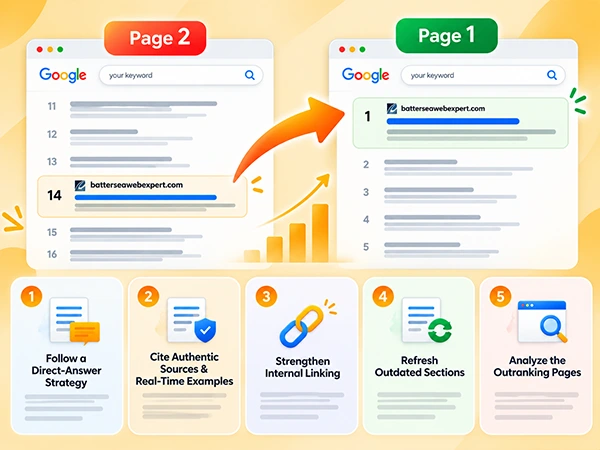
Firstly, you need to understand that ranking on page two is far better than no ranking at all. If your website is visible on the SERP second page (between 11-20 positions), it means Google considers your page relevant enough to rank for the query. However, other competing pages are currently ranking higher because they may be a better match for the search intent or demonstrate stronger relevance, content quality, authority, or trust.
Here’s how you can improve Google rankings.
- Follow a Direct-Answer Strategy: Ensure you have answered users’ queries right after the heading placements, before diving into the thorough details and other essential things.
- Cite Authentic Sources & Real-Time Examples: Always support your writing, facts, and claims with authentic citations and real-world examples to make your content credible for both users and search engines.
- Strengthen Internal Linking: Add relevant contextual internal links from authoritative pages to important low-performing, new, or orphan pages using descriptive anchor text. This may help Google discover and understand your pages, distribute internal authority, and eventually improve the chances of those pages ranking in search results.
- Refresh Outdated Sections: Regularly update your previous content sections that contain old information with the latest changes to keep the overall blog fresh and well-optimized.
- Analyze the Outranking Pages: Take your time and analyze the pages that are ranking on the first page to determine what format, information, and sources they are providing. After that, try to improve your content’s overall usefulness for higher Google search rankings.
Briefly, if you are thinking about “why is my website ranking on page 2”, the answer may lie in your content. As we mentioned earlier, Google has already recognized your content as relevant; you just need to make a few changes and improve content usefulness for a first-page ranking.
How to Diagnose Why Your Website Is Not Ranking
Below is a practical checklist to help you identify potential ranking issues, what to check, and which tools to use for diagnosis. Take a look.
| Check | What to Look For | Tool to Use |
| Google Search Console | Impressions, clicks, average positions, indexing issues, manual actions, and Search Console notifications. | Google Search Console |
| Indexing | Check that all your important pages are indexed and are not blocked. | Google Search Console & Google Search |
| Technical SEO | Crawl errors, broken links, slow page speed, mobile usability issues, redirects, and Core Web Vitals problems. | Google Search Console & PageSpeed Insights |
| Search Intent | Verify whether your content matches the search intent behind your target keywords. | Google Search |
| Keyword Competition | Assess content quality, backlinks, authority, and ranking strength of the pages currently ranking on SERP. | Semrush & Ahrefs |
| Competing Pages | Compare your content with the competing pages to evaluate content’s depth, structure, topical coverage, and user experience. | Google Search, Semrush, & Ahrefs |
| Content Quality | Ensure your content is original, accurate, up to date, comprehensive, and genuinely useful to readers. | Manual Content Review |
| Internal Links | Check whether your website’s internal linking structure is logical. | Screaming Frog & Semrush |
| Backlinks & Authority | Review the quality, relevance, number, and growth of backlinks. | Ahrefs & Semrush |
| Cannibalization | Identify whether multiple pages of your website are targeting the same or closely related keywords and competing with each other. | Google Search Console & Semrush |
| Ranking History | Check whether your rankings have gradually declined or dropped suddenly after a website change, algorithm update, or content change. | Google Search Console & Semrush |
| Make Changes | Prioritize the issue you identify and make targeted improvements instead of changing multiple SEO elements without accurate reasons. | SEO Audit Findings |
| Monitor Results | Track impressions, rankings, traffic, clicks, and indexing after making changes. | Google Search Console, Google Analytics, & Semrush |
How to Fix a Website That Is Not Ranking on Google
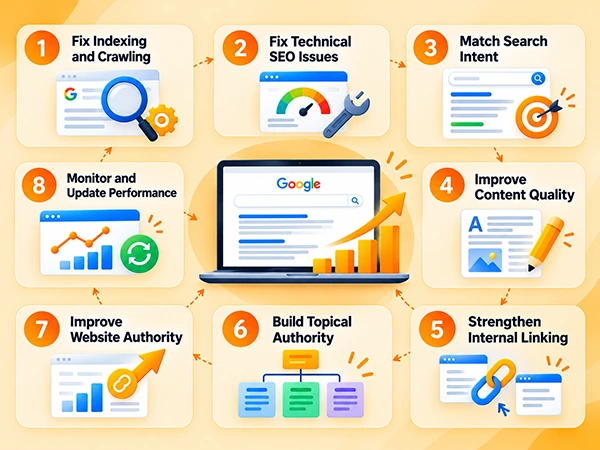
Once you have found the answer to your query, “Why am I not ranking on Google?”, here’s a practical approach to fix all the issues. Check it out.
Step 1: Fix Indexing and Crawling
Start by fixing indexing errors, ensuring Google can crawl, understand, and recognize your web page accurately. For this, you have to.
- Inspect URLs: Open the Search Console URL Inspection tool >> Paste your web page URL >> Check whether Google crawled your page or not.
- Determine Blocking Files: Verify your password protection settings or robots.txt file is not blocking Googlebot from crawling your web pages.
Step 2: Fix Technical SEO Issues
You must resolve underlying technical SEO issues that block search engines from indexing or rendering your pages properly. For this, try:
- Improve Page Speed: Use PageSpeed Insights to test your website performance. Fix your slow-loading pages, especially on mobile devices, to enhance site usability and crawlability.
- Submit XML Sitemap: Create a clean and accurate XML sitemap for your website, then submit it through Google Search Console to help Google discover and crawl your content more efficiently.
- Fix Website Errors: Fix broken links, manage duplicate content, resolve incorrect redirects, and improve your website structure so important pages are easy to discover.
Step 3: Match Search Intent
Analyze what your target users are actually browsing for and reshape your content accordingly to match their intent, format, and depth. For this, perform the following:
- Analyse Google First SERP: Review the pages that are currently ranking for your targeted keywords to understand the type, format, and depth of the content Google is showing.
- Match User Intent: Determine whether users are looking for informational, commercial, navigational, or transactional content and then precisely align your page.
- Cover Topic Thoroughly: Answer the main question clearly in your content while addressing relevant subtopics, questions, and information users may need to learn before taking any actions.
Step 4: Improve Content Quality
Do not write content to manipulate ranking; improve your content so it provides useful, relevant, and original information that thoroughly covers the user’s search query. For this, try:
- Update Outdated Information: Review outdated sections of your content, such as old statistics, examples, facts, links, and recommendations to keep your blog fresh and relevant.
- Improve Content Depth: Expand generic or incomplete pages by adding useful information that directly supports the user’s search intent.
- Remove Unnecessary Content: Eliminate repetitive, irrelevant, and even low-value sections that lack information and do not help visitors accomplish what they came to the page to do.
Step 5: Strengthen Internal Linking
Build a logical internal linking structure to help users and search engines to discover important pages across the website. For this, you can perform:
- Link Relevant Pages: Add contextual links between your related blog posts and service pages/product pages.
- Prioritize Important Pages: Ensure your key commercial and conversion-focused pages receive internal links from other authoritative pages on your website.
- Use Descriptive Anchor Text: Use clear and relevant anchor text to help both users and search engines understand what the linked page is about.
Step 6: Build Topical Authority
To demonstrate comprehensive coverage of topics relevant to your business, create a well-connected content structure. For instance:
- Create Supporting Content: Publish relevant, useful articles that answer related questions and address different stages of the user’s search journey.
- Build Topic Clusters: Through internal linking, connect all your supporting informational content with the relevant service, product, or category pages to enhance your user and search engine navigation, from collecting information to making a purchase decision.
- Cover Relevant Subtopics: Analyse competing pages that are ranking on Google’s first page to identify important gaps in your existing content and improve your content accordingly.
Step 7: Improve Website Authority
Website authority also plays a vital role in Google rankings. So, strengthen your domain credibility by earning relevant references and links from trustworthy sources. For this, you can try:
- Earn Relevant Backlinks: Try to build links naturally through digital PR, industry resources, useful content, partnerships, and other legitimate outreach activities.
- Create Valuable Content: Always add original research, guides, resources, and case studies to support your cited facts and statistics, so that people may find your content useful and authentic.
- Avoid Manipulative Link Building: Do not rely on spammy, paid, or irrelevant links that are primarily designed to manipulate search rankings.
Step 8: Monitor and Update Performance
Always remember, SEO improvements are not a one-time task. It requires ongoing monitoring because rankings, search behaviour, competitors, and website performance change over time. For this, do:
- Monitor Search Performance: You can use Google Search Console to constantly monitor clicks, impressions, queries, indexing issues, and changes that affect search visibility.
- Track Business Results: Rather than relying only on ranking, monitor relevant outcomes such as organic leads, calls, sales, and conversions.
- Update Underperforming Pages: Regularly review pages that lose traffic or fail to generate results. Also, improve your content according to search intent alignment, internal links, or technical performance where necessary.
How Long Does It Take to Rank on Google?
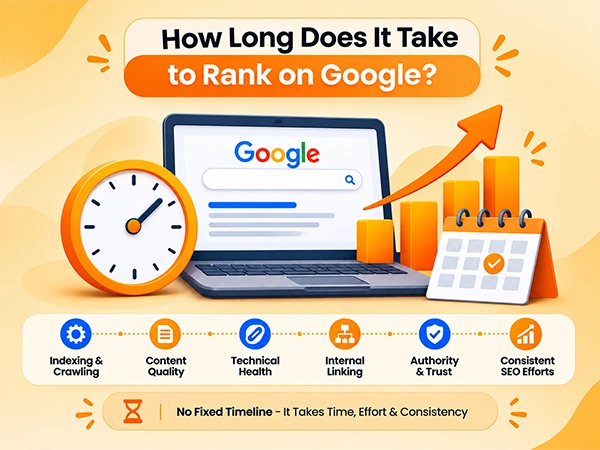
There is no guaranteed timeframe for how much time it will take to rank your website on Google. SERP ranking depends on various factors, such as indexability, competition performance, technical health, content quality, internal linking, and continuous SEO practice.
According to Semrush’s report of 28,000 newly observed domains, around 41% of qualifying domains had at least one keyword ranking in Google’s top 10 after six months. However, rankings can fluctuate, and only 4.2% of the domains maintained at least one top-10 ranking throughout the 13-month study period. This statistic shows that ranking on Google can take several months, while achieving and maintaining competitive positions requires consistent, ongoing SEO efforts.
Additionally, Google Search Console also states that some changes can take a few days to affect search results, while others can take several months for its systems to learn and confirm the improvements. Therefore, there is no fixed timeline for achieving stable rankings.
Conclusion
In a nutshell, ranking problems rarely have one universal cause. It can be because of various factors, from indexing, relevance, content, technical SEO, and authority to competition. However, you can use Google Search Console and SERP analysis to identify what the actual reason is behind why your website is not ranking on Google. Additionally, remember that instead of making random SEO improvements, try to focus on targeting the right audience, content approach, and website performance.
So, now that you have learned the several potential reasons behind your query, “Why am I not ranking on Google?”, go through each attentively to enhance your website ranking effectively. If you’re still struggling to improve your rankings, getting a professional SEO audit can help uncover the issues affecting your website and identify the right growth opportunities.
Frequently Asked Questions
Why is my website not ranking on Google?
Ans: Your website may not rank because of several reasons, including indexing issues, low-quality content, poor technical SEO, weak on-page optimization, ineffective intent linking, complex website layout, and insufficient relevant backlinks.
Why is my website indexed but not ranking?
Ans: Your indexed website is a sign that Google has recognized your website and its content. If it fails to rank, it may be because you may lack relevancy, quality, or authority compared to competing pages.
Why is my website not showing on Google at all?
Ans: Generally, if your website is not showing on Google, it may be because it has not been indexed yet or your technical settings are blocking Googlebot from accessing your content.
Why am I ranking on page 2 but not page 1?
Ans: Ranking on page 2 (11-20 positions) means Google has recognized your website as relevant. However, the competing pages on the first page (1–10 positions) outperform you in authority, topical depth, and user experience.
Can a new website rank on Google?
Ans: Yes, a new website can rank on Google. Still, it requires time, patience, and consistent SEO practice to build trust and credibility with search engines.
Do backlinks matter for Google rankings?
Ans: Definitely, backlinks are one of the most important and confirmed signals in Google’s ranking system. They serve as an “external vote of confidence” that tells Google that your website is relevant, trustworthy, and authoritative.
How do I check if Google has indexed my website?
Ans: To check if Google has indexed your website, sign in to your Google Search Console account, paste the full URL into the URL Inspection tool search bar, and press Enter. Check what URLs are on Google.
How long does it take to rank on Google?
Ans: There is no guaranteed timeframe for how long it can take Google to rank your website. Ranking entirely depends on various factors: domain age & authority, keyword competition, content quality, technical health, and consistent SEO practice.
Why did my Google rankings drop?
Ans: Your Google rankings may drop due to several factors, such as algorithm updates, technical issues, lost backlinks, outdated content, stronger competitors, and changing search intent.