
- How to See Your Subscribers on YouTube on Various Devices?
- How to See Subscribers on YouTube on iPhone and Android?
- Troubleshoot: Why Are YouTube Subscribers Not Showing?
- What Subscriber Details Will You Get on YouTube?
- Common Challenges You May Face While Managing Subscribers
- Why Does YouTube Not Show All Subscribers?
- What is the Difference Between Public and Private Subscribers on YouTube?
- What are the Benefits of Checking Your YouTube Subscribers Regularly?
- Tips to Grow Your YouTube Subscribers Faster
- Wrapping Up!
- Frequently Asked Questions
Confused about how to see your subscribers on YouTube? Well, keeping track of your regular viewers is a great way to stay connected with your audience and expand your channel more strategically.
Whether you are using a desktop, an iPhone, or an Android, checking the details of your subscribers requires a few taps and hardly 3 to 4 minutes of your valuable time.
Therefore, in this guide, we will direct you through the simple steps of your query, “How can I see my subscribers on YouTube?” So that you can stay informed and grow your channel confidently.
Quick Answer
How to See Your Subscribers on YouTube: Open YouTube on your device >> Sign in to your YouTube account >> Click on your YouTube account profile picture >> Head over to YouTube Studio >> Click on the Dashboard >> Scroll down to locate the Recent subscribers box >> Go for the SEE ALL.
How to See Your Subscribers on YouTube on Various Devices?
Nowadays, YouTube has a built-in feature, YouTube Studio, which enables its users to analyze all sorts of important characteristics about their channel’s performance and audience details.
Thus, in this section, we are going to break down an easy way to help with your concern, “How to see your subscribers on YouTube easily?” So, take a look attentively.
1. How to See Subscribers on YouTube on Desktop?
If you are using YouTube on your computer and want to check the list of subscribers on it now, here are the steps outlined below for you.
- Open YouTube on your device.
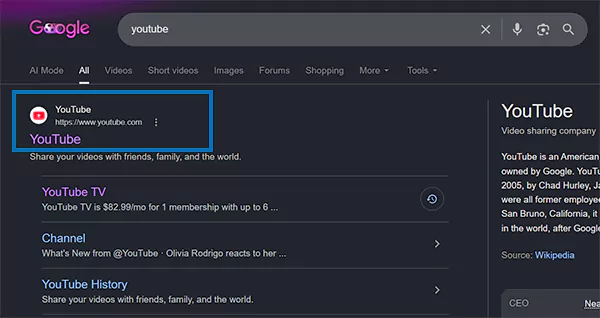
- Sign in to your YouTube account.
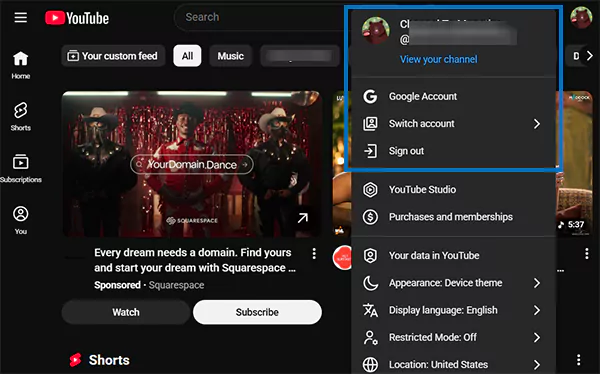
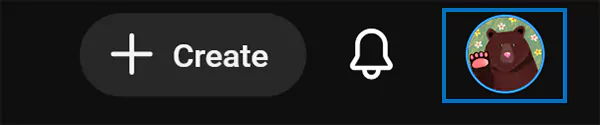
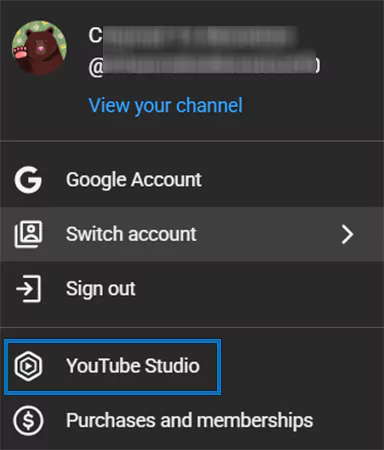
- Click on your YouTube account profile picture.
- Head over to YouTube Studio from the drop-down menu.
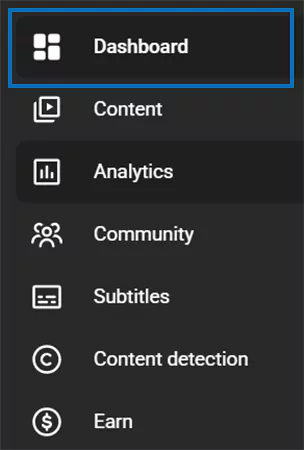
- Click on the Dashboard option situated on the left side panel.
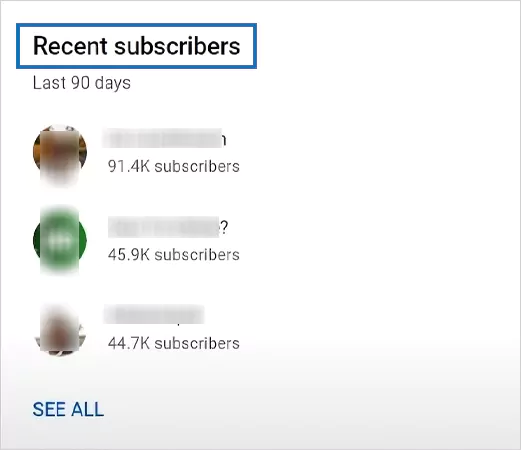
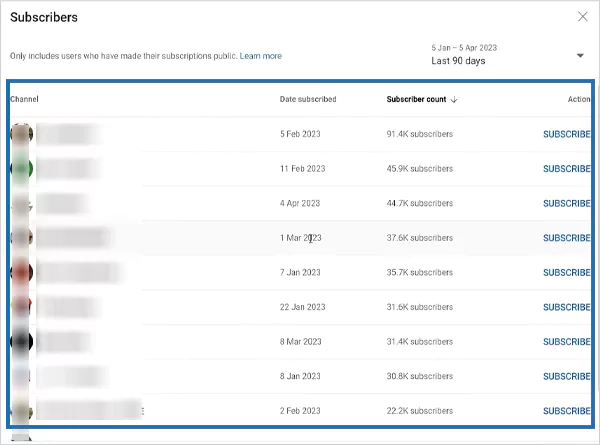
- Scroll down to locate the Recent subscribers box.
- Click on SEE ALL.
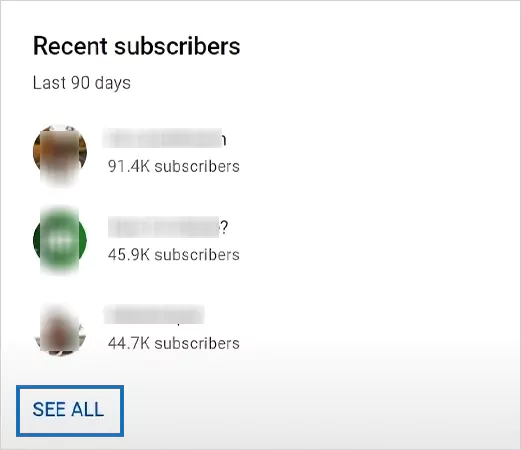
- Lastly, now you can scroll down within the list and check out your subscribers on YouTube.
Hence, to boost your YouTube account engagement and reach, a tip that works best is to download the YouTube video and share it on other popular social media sites, and significantly increase your subscriber count.
How to See Subscribers on YouTube on iPhone and Android?
Note: Although the YT Studio mobile application exists, we can’t see the subscriber list on that. Therefore, we have to use the desktop version or perform the process through any browser to access the list.
Interestingly, both iOS and Android implement almost the same steps to check the subscriber list of your YouTube channel, which will require only a few simple taps.
So, follow the below-mentioned measures to start the process of how do you check your subscribers on YouTube.
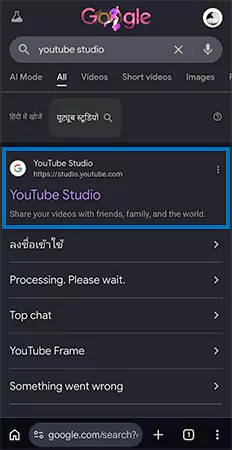
- Open any browser on your mobile and search for YouTube Studio and tap on it. For instance, Google Chrome.
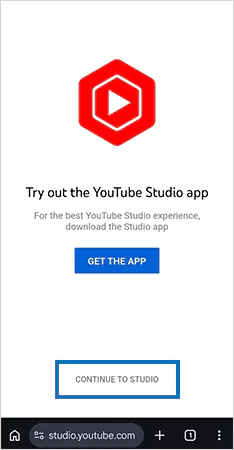
- Head over to Continue to Studio.
- Tap on the Dashboard icon situated on the left side panel.
- Navigate to the Recent subscribers box.
- Go for the SEE ALL option.
- Lastly, now you can scroll down within the list and check out your subscribers on YouTube.
Consequently, by adhering to the aforementioned measures, you can explore your subscribers’ list without any difficulty.
Troubleshoot: Why Are YouTube Subscribers Not Showing?
In this section, we have presented some simple yet practical fixes for your query, “Why are my YouTube subscribers not showing?”. Try them out to check your subscribers list without any difficulty.
- Update YouTube: Small glitches and errors can be easily fixed by updating the application. Simply, at first try to update the YT app or your device to resolve the issue.
- Refresh Browser: Too many active tabs at the same time or spammy URLs may create the nuisance. Close YouTube, refresh your browser, and then try to see your subscriber list again.
- Switch to Desktop Mode: If you are checking your subscriber list on mobile, switch your browser to desktop mode by clicking on the three horizontal dots in the bottom-right corner for better results.
- Check Your Internet Connection: Sometimes the issue may not be with the YT interface; it’s maybe the connection you are using. Ensure your internet is working perfectly, delivering appropriate speed & range, and after that refresh YouTube Studio and try again.
- Wait for Subscribers Update: Rarely, YouTube analytics takes time to update. If nothing works out, maybe the reason your subscriber is not showing is the interface process. Thus, wait for a few days to let the process complete, and then you can check your list.
What Subscriber Details Will You Get on YouTube?

After learning the simple steps of how to see your subscribers on YouTube, comprehending the sort of insight you will get about your audience will help you make more strategic decisions for your future content.
Therefore, let’s explore the segment below to know the details you will get on the platform and other information that will be hidden from you for privacy purposes.
1. Subscribers’ Details You Can See
Here is the information that you can access on the platform without any difficulty. Check them out straight away.
- YouTube Channel Name: You can see the channel and username of your subscriber.
- Profile Picture: The official display photo will be associated with the username.
- Date Subscribed: There will be a date mentioned on which the user started following your YouTube channel.
- Subscriber Count: Lastly, you can see the exact number of followers of your audience.
2. Subscribers’ Details You Cannot See
As we have mentioned earlier, some kinds of information will be kept confidential by the platform for the privacy concerns of its users. So, here we have listed them for you. Take a look.
- Personal Information: YouTube does not disclose any kind of personal details of its users. This may include email address, mobile number, gender, and geographical location.
- Private Subscription: If the user has chosen the private subscription, you may not be able to see them in your subscriber list.
- Closed Accounts: If your subscriber has closed their account, it may also not be visible on your list, and most importantly, they will not be counted as your existing follower anymore.
In essence, knowing who is following your account will help you connect with your audience. But always remember, YouTube shows only limited information to you. So, customize your content accordingly for better outcomes.
Common Challenges You May Face While Managing Subscribers
Having a good number of prospective subscribers on your YouTube channel surely offers you several benefits, including enhanced monetization opportunities, improved credibility, and eventually boosts your visibility on the platform.
Apart from this, there might be some potential drawbacks that you have to face once your channel starts growing.
Thus, check out the pointers below to learn more about this.
1. Facing Negative Comments
After starting to gain subscribers on your YouTube channel, there might be a chance of receiving negative feedback from your audience. But facing them constructively will show your professionalism and intent to make improvements.
2. Retaining Your Subscriber Journey
Once your channel starts expanding, your viewers will soon begin expecting even more from you. Firstly, you need to comprehend your audience’s behavior and preferences, and then proceed with preparing your content accordingly.
3. Dealing With Subscriber Count Drop
Having a sudden fluctuation in subscriber count over time is normal. If you have been facing the same issues regularly, go to the YouTube Studio and check your content performance, audience behavior, and other useful insights to learn where you are lacking.
In brief, YouTube holds a massive user database, and shifts in trends, preferences, and algorithms are common. So, to overcome the aforementioned challenges, you need to start understanding the platform and your users precisely.
Why Does YouTube Not Show All Subscribers?
Evidently, YT hides certain subscribers’ details from the list to maintain user privacy, prevent spam, and comply with certain restricted account settings. Below, we have mentioned some primary reasons; take a look.
- Private Subscriptions: Users can choose whether to keep their subscriptions public or private through their YouTube privacy settings. However, only public subscribers are visible in the subscriber list.
- Closed / Suspended Accounts: YT periodically removes suspended or spammy accounts from the interface. When these users’ accounts are deleted, their details will automatically be removed from your YouTube subscriber list and overall count.
- View Limitations: In YouTube Studio, the default view for the recent subscribers list only displays activity from the last 90 days.
What is the Difference Between Public and Private Subscribers on YouTube?
Simply, the difference between public and private subscribers boils down to: privacy and visibility. Here we break down these factors in a tabular form; check it out.
| Features | Public Subscribers | Private Subscribers |
| Counted in Total Subscriber Count | ✅ | ✅ |
| Channel Name Visible to Creator | ✅ | ❌ |
| Profile Picture Visible to Creator | ✅ | ❌ |
| Appears in Recent Subscriber List | ✅ | ❌ |
| Affects YT Channel Monetization Eligibility | ✅ | ✅ |
| Contributed to the Subscriber Growth Metrics | ✅ | ✅ |
| Privacy Protection Level | Standard | High-Level |
What are the Benefits of Checking Your YouTube Subscribers Regularly?
Monitoring your YouTube subscriber list constantly can help you get valuable insights into your subscribers and eventually assist in enhancing content strategy for long-term, beneficial results.
Furthermore, by comprehending who subscribed to your channel, you can attain several benefits, such as:
- Track Channel Growth: Checking subscribers periodically helps to determine the channel growth. For instance, the sudden increase and decrease in subscriber count will enable you to evaluate the effectiveness of content and promotional efforts.
- Improve Content Strategy: Subscriber insights will reveal user behaviour and engagement patterns, by which you can determine what sort of content resonates more with your audience and the topics you can avoid.
- Build Strong Community: Knowing who follows allows you to engage with your audience more effectively. The constant replies on the comments, producing the user-preferred videos, and skipping the least discussed topics will strengthen user loyalty.
- Identify Potential Issues Early: Regularly monitoring will let you know if there’s an unusual drop in the subscriber count or declining engagement. Determining these issues earlier will assist to take a more informed and strategic decisions before affecting the channel growth.
Tips to Grow Your YouTube Subscribers Faster
To boost the growth of your YT channel, optimize your handle, consistently upload highly-searchable, trending content, utilize call-to-actions (CTA) strategy in your videos, and more. Let’s check out the pointers below for more clarity.
- Optimize Your Channel Setup & Branding: Prepare a short 30–40 second channel trailer to provide a straightforward introduction to new visitors and subscribers. Also, ensure your YT handle is verified with an accurate name, country, and keyword to make both the platform and the users clearly understand your niche.
- Craft Effective Hooks & CTAs: Always add an effective CTA, such as “Subscribe Now”, in the first 10 seconds of your videos to strategically promote your channel. Besides, try to add more engagement actions in the video for users, ensuring it doesn’t diminish the content quality.
- Leverage YouTube Shorts & Repurposing: Start making engaging short videos of your content to drive traffic to your niche-specific long videos. Along with this, take a moment to repurpose your lengthy clips with the updated information and more stats, maintaining content relevancy.
- Determine Trending Content: Check for the “Popular with Different Audiences” card in YT Studio to figure out which sorts of content can attract more viewers on your channel. By doing this, you can not only keep your niche fresh and updated, but also can actually create a strong community for yourself.
- Prioritize Binge-Friendly Paths: Rather than creating a chronological list, try to make your playlist outcome-based. For example, Step-by-Step Guide (Part 1 & Part 2). This will help users to contemplate to watch each part of your videos without fail.
Wrapping Up!
Knowing how to see your subscribers on YouTube on different devices is one of the most beneficial choices you can implement to bolster your online growth.
It gives a clear idea of who is following your account and what kind of content they are expecting. Likewise, there might be a chance that you won’t be able to see all your subscribers because of privacy concerns.
Therefore, now that you have learned how to see subscribers on YouTube, we recommend that you check your subscriber list once a month to understand how your account is performing.
Frequently Asked Questions
How can I see who my subscribers are on YouTube?
Follow the following steps to learn how to see who your subscribers are on YouTube without any difficulty:
- Open the YouTube application on your device.
- Sign in to your YouTube account.
- Tap on your YouTube account profile picture.
- Locate the YouTube Studio option from the list.
- Click on the Dashboard situated on the left side panel.
- Scroll down to the Recent subscribers box.
- Click on the SEE ALL option.
Lastly, check out the complete list of your subscribers along with their basic information.
Can YouTubers see all the details of their subscribers?
No, creators cannot see their entire list of YT subscribers. The platform only displays the information of the users who have kept their subscription public. Private subscribers’ details are not included on the list.
How many subscribers should I have to start making money from it?
To start generating money from your YouTube channel, you need at least 1000 subscribers and 4000 valid public views within the last 12 months.
Can I see who unsubscribed on YouTube?
No, to maintain user privacy, YouTube does not allow creators to see exactly who unsubscribed from their channel. However, you can monitor changes in subscriber count through YouTube Studio analytics.
Why is my subscriber count changing?
Generally, subscriber count changes when users subscribe or unsubscribe from your channel. Also, the platform removes closed and spammy accounts from your subscriber list, which also affects the count.
Can I see private subscribers on YouTube?
No, YT does not show the details of private subscribers. Although these users are included in the overall subscriber count, their name, profile picture, and contact information remain hidden.