
- What Is the Google Local Guide Program?
- Local Guide Program: Categories, Points, Levels & Badges Explained!
- What are the Requirements to Join Google Local Guides?
- How to Sign Up for the Google Local Guides Program?
- How Does the Local Guides Program Work?
- What is Google Local Guide?
- What Are the Advantages and Perks of Being a Google Local Guide?
- What Are Google Local Guide Rewards?
- What Responsibilities and Duties Does a Local Guide Have?
- How Can You Score Google Local Guide Points, Level Up, and Earn Badges?
- How to Check Your Google Local Guide Level?
- What Are the Restrictions Associated with Being a Local Guide?
- Local Guide Reviews: The Positive and the Negative Side!
- How Does Google Local Guides Impact Local SEO?
- Is the Google Local Guide Program Worth Joining in 2026?
- Wrapping Up!
- FAQs
Google Maps has become an essential tool for finding local businesses, restaurants, services, and even popular attractions. But have you wondered who updates the information and keeps it accurate? Here’s exactly where the role of the Google Local Guide Program comes in!
The Google Local Guide Program is a free community initiative by Google that allows users to contribute reviews, edits, videos, and local information to Google Maps. In return, contributors earn points, unlock higher levels, receive badges, and often gain access to exclusive rewards and perks.
Thus, if you are curious to learn more about this program, read on till the end to discover what is Google Local Guide, its joining procedure, various aspects, benefits, and so much more.
So, without wasting any time, let’s dive straight into the details—
What Is the Google Local Guide Program?
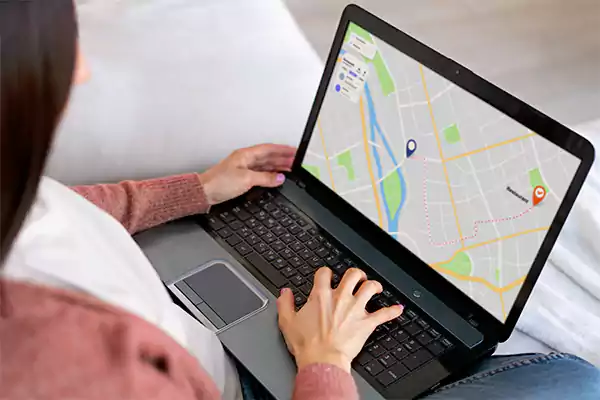
To explain what the Google Local Guides program is, let’s start by quoting Google’s official page: “Local Guides is a global community of explorers who write reviews, share photos, answer questions, add or edit places, and check facts on Google Maps. Millions of people rely on the contributions of Google Local Guides to decide where to go and what to do.”
So, this clarifies that the Local Guides program empowers a global community of users to share insights, write reviews, upload photos, fact-check, edit Google Business Profile information, and maintain the accuracy of Google Maps and its broader range of features.
Fundamentally, this program encourages individuals to contribute local business information and details to Google Maps. Through reviews, photos, and corrections, participants earn points and a Google Local Guide pin badge for their contributions to enhancing map accuracy and providing valuable insights to others.
Local Guide Program: Categories, Points, Levels & Badges Explained!
Here are the categories you can add to the Google program along with the Google Local Guide points, Google Local Guide levels, and Google Local Guide badge procedure. Check them out.
1. Google Local Guide Program Categories
The Local Guides program covers a wide range of categories, such as restaurants, attractions, and more. In these categories, guides share insights and reviews about the places they’ve visited, helping users explore with confidence —
- Restaurants
- Cafes
- Hotels
- Attractions
- Landmarks
- Parks
- Shopping centers
- Museums
- Theaters
- Events
Subsequently, the individuals who excelled in enhancing the user experience were ranked in these categories —
- Helpful Hero
- Inclusive Mapper
- Community Builder
- Creative Contributor
- Local Business Champion
- Sustainability Star
2. Google Maps Points System
By contributing to the map through reviews, photos, and edits, Local Guides earn points and increase the accuracy and usefulness of the platform. To be precise, points are earned through these contributions to Google Maps —
| Activity | Points Earned |
| Check a fact | 1 point |
| Rate a business | 1 point |
| Respond to Q&As | 3 points |
| Tag a photo | 3 points |
| Edit information | 5 points |
| Upload a photo | 5 points |
| Write a description (in list) | 5 points |
| Upload a video | 7 points |
| Publish an eligible list | 10 points |
| Write a review (with more than 200 characters) | 10 points |
| Add a place | 15 points |
| Add a road | 15 points |
3. Google Local Guide Levels
As Local Guides collect points, their level increases. Higher levels come with special attributes that enhance their status, influence, and impact. Notably, the program rewarded top-level Local Guides with benefits like digital badges, invites to exclusive events or partner promotions, and early access to Google features.
Coming back to emphasize the main point, the program levels comprise —
| No. of Levels | Points Rewarded |
| Level 1 | 0 points |
| Level 2 | 15 points |
| Level 3 | 75 points |
| Level 4 | 250 points |
| Level 5 | 500 points |
| Level 6 | 1,500 points |
| Level 7 | 5,000 points |
| Level 8 | 15,000 points |
| Level 9 | 50,000 points |
| Level 10 | 100,000 points |
Note: The Google Maps points system update may take up to 24 hours. Also, the earned points don’t expire, but the platform may decrease them if the content is removed or violates stated terms & conditions.
4. Google Local Guide Badge
Last but not least, the Local Guide Program offers badges to highlight Guides’ accomplishments, such as contributions in specific categories, showcasing expertise and dedication in the Local Guide community.
By referring to the table, you’ll notice that different types of badges can be earned in accordance with your levels and the points you accumulate —
| Level | Points | Badge |
| Level 1 | 0 points | No badge |
| Level 2 | 15 points | No badge |
| Level 3 | 75 points | No badge |
| Level 4 | 250 points |  |
| Level 5 | 500 points |  |
| Level 6 | 1,500 points |  |
| Level 7 | 5,000 points |  |
| Level 8 | 15,000 points |  |
| Level 9 | 50,000 points |  |
| Level 10 | 100,000 points |  |
Fun Fact: According to the Local Guide Connects Leaderboard, as of January 2025, Bartek Maryniak is the number one Google Maps Contributor with over 1,997,997 points and several top badges.
What are the Requirements to Join Google Local Guides?
There is no professional accomplishment, fees, or any specific certification required for Google Local Guide sign up. You just have to:
- Google Maps Local Guide program is strictly for individuals.
- Make use of a standard, active Google Account.
- You must meet the legal age of the country you are native to. For instance, in India, it’s 18 years or older.
- Your account must not be violating any Google policies and must be carefully adhering to all the stated ones.
How to Sign Up for the Google Local Guides Program?
If you’re curious to become a Google Maps Local Guide and want to know how to do so, you’ll find your answer just now. Simply follow these steps to sign up for the Local Guides program and begin your journey as an online guide—
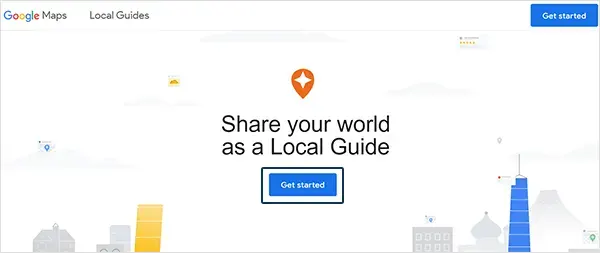
Step 1: Visit the ‘Google Local Guide sign up page‘ using your respective browser.
Step 2: On the sign-up page, click on ’Get Started.’
Step 3: After that, you need to enter the ‘Name of your City.’
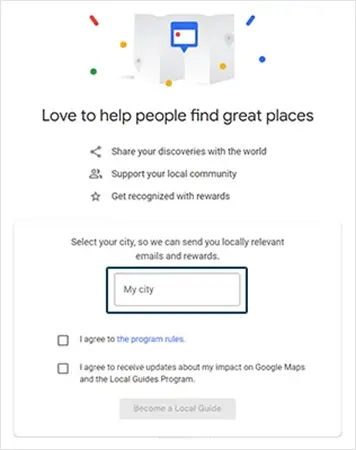
Step 4: In addition to that, you also need to tick the following two checkboxes;
- ‘I agree to the program rules.’
- ‘I agree to receive updates about my impact on Google Maps and the Local Guides Program.’
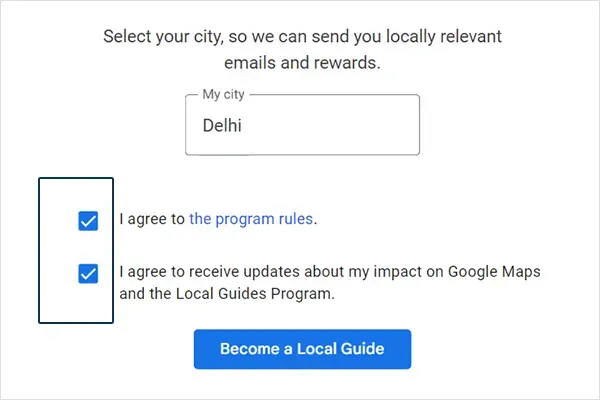
Step 5: Once you’ve done that, click on ‘Become a Local Guide.’
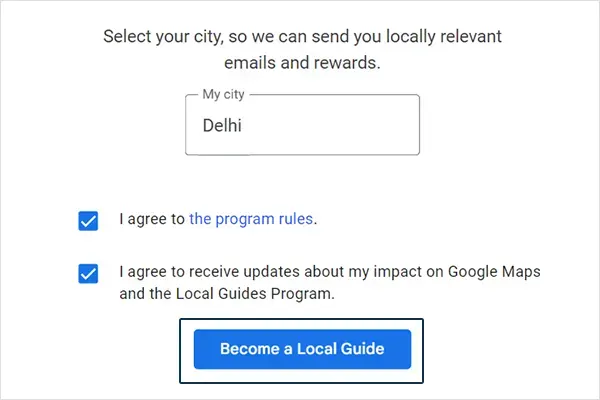
Step 6: Now, click on ‘Start Contributing’ and begin earning points by making contributions to Google Maps. You can leave reviews and upload photos of the places you’ve visited.
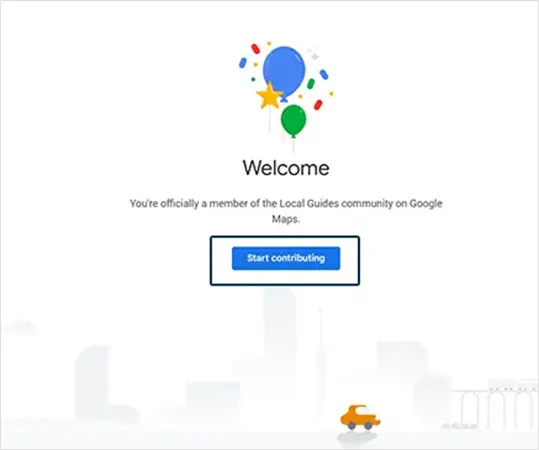
Note: As a Google Maps contributor, the more you review, engage, and interact, the greater your guide ranking becomes.
How Does the Local Guides Program Work?
This program turns the Google Maps feedback process into a rewarding game. As you visit different places, it prompts you for feedback like reviews and photos. When you do this, your contribution helps you earn points, with different contributions yielding varying points.
By earning points, you’ll be able to elevate your Local Guide level, and over time, as you progress, you’ll earn badges showcasing your contributions, special Local Guide rewards like community recognition, occasional rewards, and access to selected Google programs.
So, to make a long story short, this is a way to turn your valuable feedback into recognition and rewards.
What is Google Local Guide?
Google Local Guides are prominent Google Maps users who enjoy special benefits, like early access to new features of this search engine.
They play a key role by responding to queries about local businesses, crafting Google Maps reviews showcased in local search outcomes, and impacting local SEO rankings.
Their contributions encompass a variety of inputs like reviews, pictures, answers, fact-checks, and more.
Not just that, they actively enrich and adjust location details on Google Maps, often serving as the primary information source for local neighborhoods.
To be precise, these influential users have the ability to add and modify locations and also verify information listed on Google Maps.
Note: According to the preeminent search engine, countless Search results and Google Maps users depend on the insights provided by Local Guides.
What Are the Advantages and Perks of Being a Google Local Guide?
After you sign up for the program, you start sharing your insights and local business photos as a Local Guide. By doing so, you’re not only helping future customers and increasing online visibility for businesses, but you’re also earning the following perks—
- Exclusive Features: You’ll get access to new features of this top search engine before they’re widely available.
- Exclusive Rewards: You’ll occasionally receive unique Local Guide rewards from partner companies.
- Earn Badges and Reach Higher Levels: You get your first Local Guide badge when you reach level four in the Guide program. This badge recognizes your contribution and increases the visibility of the places you’ve visited.
- Community Connections: You’ll be able to connect with fellow local guides in a vibrant community.
- Personal Development: This will enhance your writing, photography, and review skills.
- Invitation for Google Events: The platform will also reward you with exclusive perks, early access to new products, and top-secret partner prizes. Furthermore, if you’re lucky, you might even be featured in their promotional video, or you might be invited to community events and special programs that gather together the world’s finest local guides.
- Digital Badge: Last but not least, as a token of recognition, the platform also provides Local Guides with a unique digital badge on Google Maps for their valuable contribution.
Point to Consider: These perks are less common and available mainly to people with upper contribution levels. Furthermore, it’s worth noting that these offerings differ by location.
What Are Google Local Guide Rewards?
The Google Maps contributor does not get any monetary compensation. Instead, they earn–
- Early access to Google features.
- Occasional event invitations.
- Google merchandise, and
- An impressive digital recognition.
- Opportunities to participate in promotional campaigns.
What Responsibilities and Duties Does a Local Guide Have?
The responsibilities and duties of a Local Guide include —
- Contribute helpful Google Maps reviews, star ratings, and photos for local businesses and places.
- Suggest new places and add missed places to Google Maps.
- Edit and enhance your Google Business Profile for accuracy.
- Accurate mapping by adding, modifying, or correcting roads in Google Maps.
- Verify the accuracy of the information added to Places on Google Maps.
- Report and address instances of spam content.
- Create personalized lists of places for others to discover.
- Help maintain accuracy by marking closures on Google Maps.
- Engage in the community by answering questions and participating in discussions.
Through these responsibilities, Local Guides play an important role in enhancing the mapping and local business experience for users.
How Can You Score Google Local Guide Points, Level Up, and Earn Badges?
To move up the Google Local Guide levels or progress to attain the Google Local Guide badge and benefit, follow these key steps—
- Craft useful Google Maps reviews for local businesses.
- Enhance places by adding quality photos.
- Update and correct business details.
- Respond to user queries about places.
- Recommend new locations for Google Maps.
- Engage actively with the Local Guides community.
- Attend events for extra rewards and recognition.
These actions allow you to ‘earn points for your contributions, unlock badges when you earn points, and achieve higher levels with more points’, thereby collectively shaping your local guide journey and driving personal growth.
How to Check Your Google Local Guide Level?
To check your Google Local Guide level, simply follow the mentioned steps on your device. Before, ensure you are logged in to the correct Google Account.
- Open a browser on your device and go to Google Maps.
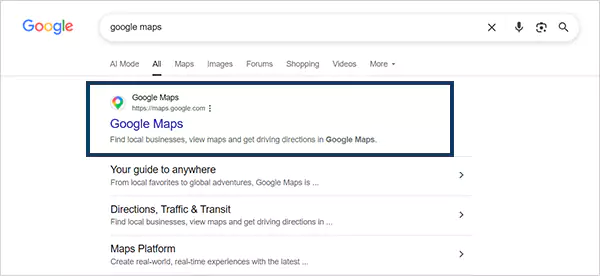
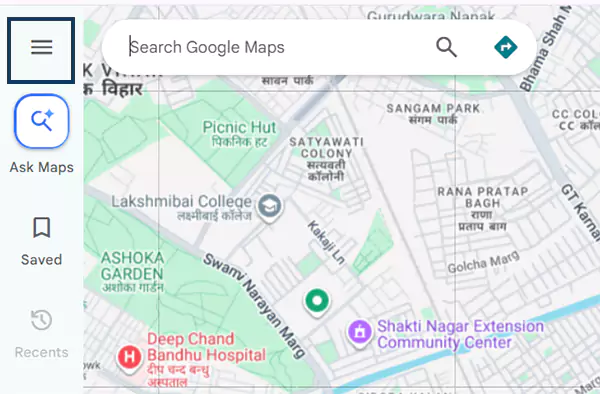
- Click on the three horizontal lines icon (≡), located in the top-left corner.
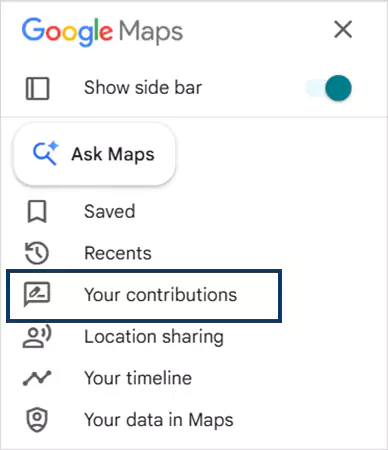
- Head over to the “Your Contribution” option from the dropdown menu.
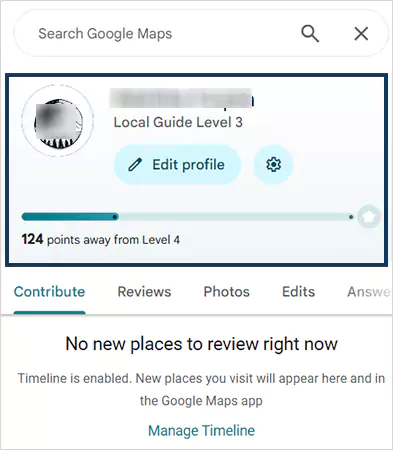
- Your current Google Local Guide levels and earned points will be directly displayed on your screen.
What Are the Restrictions Associated with Being a Local Guide?
Becoming a Local Guide does involve certain limitations. If you’re curious about them, know that when using Google’s products or services, make sure of the following —
- Do not enter or attempt to access any property or place without proper authorization.
- Don’t pretend to be someone else.
- Do not share or guide illegal actions.
- Do not post fake, misleading, or inappropriate content, including reviews, edits, or deletions.
- When participating in an Event, Local Guides must comply with the Event’s rules, regulations, and applicable laws.
- Google may remove any Local Guides from the Program at its sole discretion.
- Contributions to Google Maps for profit must come from one account and cannot be carried over to other accounts.
- You may not represent yourself as a Google employee or representative.
- Last but not least, remember that the Local Guides logo is for official use only. So, do not use it, whether online or offline, without written permission.
Briefly, remember that if you breach any one of the above-mentioned restrictions, Google may delete your Local Guide profile or decrease the earned points.
Local Guide Reviews: The Positive and the Negative Side!
For Local Guide reviews, let us first provide you with a clear snapshot of the information about the Local Guides program —
| Aspect | Details |
| Program Name | Google Local Guide Program |
| Purpose | Encourage users to contribute local business reviews, photos, and other information to Google Maps. |
| Participation Levels | 1. Level 1: 0-4 points 2. Level 2: 5-49 points 3. Level 3: 50-199 points 4. Level 4: 200-499 points 5. Level 5: 500+ points |
| Points & Activities | Earn points by: Writing reviews, adding photos, correcting business information, answering questions, and more. |
| Google Local Guide Benefits | Access to Google perks like early feature access, Local meetups, and occasionally rewards, partner offers, and community recognition. |
| Google Local Guide Eligibility | Open to anyone with a Google account. |
| Registration | Sign up through the Google Maps app or website. |
| Recognition | Badges and levels showcased on the user’s profile. |
| Contribution Impact | User input enhances the accuracy of Google Maps and helps provide valuable information to users. |
| Local Guide Connect | A platform for Local Guides to: Communicate, Share experiences, and attend local meetups. |
| Local Guides Summit | Historically organized events and community programs for highly active contributors, though availability changes over time. |
| Community Engagement | Users can interact with other Local Guides and the platform through: Forums and Events. |
| Mobile App Integration | Integration with the Google Maps mobile app for easy contribution and Tracking. |
| Rules and Guidelines | Contributors must adhere to the platform’s content policies and Quality standards. |
Now, coming to the point;
The positive aspects of Local Guides include community engagement, contributing to maps, and receiving various Local Guide rewards. However, on the other hand, there is also a potential dark side, which includes biased reviews, inappropriate content, and an excessive emphasis on rewards rather than genuine feedback.
Therefore, it is important to balance these aspects in order to maintain the credibility and usefulness of the platform.
How Does Google Local Guides Impact Local SEO?
Google does not officially list Google Local Guides as an SEO ranking factor. However, they indirectly boost local SEO by providing authentic, high-quality data and user engagement that search engines usually reward. Their contribution, such as reviews, photos, and videos, make the Google Business Profile (GBP) more visible, trustworthy, and clickable on SERP and Google Maps.
- Boost Search Visibility and Clicks: High-quality photos and detailed reviews added by the Google Local Guide significantly drive chances of higher engagement, such as direction requests, website clicks, and more foot traffic to the location.
- Collaborative Accuracy: Google Local Guides deliver constant, fresh, real-time details, like categories, location, operating hours, and honest feedback, keeping the business profile updated. Search engines prioritize businesses that maintain accurate and up-to-date profiles.
- Improved Engagement: Guides frequently upload businesses’ photos and detailed reviews, which heavily influence customer clicks, higher calls, website visits, and map interactions.
- Profile Moderation: High-level Google Local Guides hold a prominent position while reviewing, helping businesses build an impressive online reputation.
Is the Google Local Guide Program Worth Joining in 2026?
The Google Local Guides Program is worth joining for those who enjoy sharing their experiences and helping millions of users to discover accurate local information. However, if you solely want to become a Local Guide for financial gain, it may not be beneficial.
Surely, the program delivers several Google Local Guide benefits, but does not offer any monetary compensation. Here are the pros and cons of Google Local Guide sign up.
Wrapping Up!
That’s all! The Local Guides Program provides a platform for individuals to contribute valuable insights to Google Maps and Business Profiles with accurate information, new photos, and helpful reviews. It serves as an additional approach to increase your online visibility and help you make a significant impact on the world’s top search engine.
So, what are you waiting for? Go join this Local Guide program by signing up with your Google account. As you complete tasks like writing reviews and uploading photos, you’ll earn points, move up levels, and receive badges that highlight your expertise.
Essentially, this program not only enriches Maps but also rewards users with perks like early features and occasional meetups to make it a win-win for both contributors and users seeking reliable local information.
FAQs
Is Google Local Guide free?
Yes, joining and participating in this Google program is completely free. You don’t have to pay any sort of charges to become a Google Local Guide.
Are Google Local Guide rewards guaranteed?
No, the program rewards are not guaranteed, as they may vary by region and other factors. Also, while you complete 1–10 levels of contributions, there is no monetary compensation, gifts, or permanent milestone perks.
How can I level up my Google Local Guide profile?
To higher you level, you must earn points by constantly making contributions through writing reviews and uploading photos & videos of local businesses and places on Google Maps.
Can businesses join the Google Local Guide Program?
No, this program is strictly for individuals who use their personal Google Account to upload on-the-ground, real-time photos or videos and edits on Google Maps. Any contribution from the business page will not be considered.
Why are my Google Local Guide points decreasing?
Google may decrease the points if the content violates Google’s guidelines or the business gets shut down, which will also result in your respective contributions being removed from Google Maps.
Can I earn money as a Google Local Guide?
No, the platform does not provide Local Guides with money for their contributions. The Local Guides program operates voluntarily.
What do I need to be eligible for the Local Guides program?
To be eligible for the Local Guides program, you need to:
- Fulfil the minimum age criteria set for participation in your country.
- Possess an active and valid Google account.
- Enroll in the program and agree to the Local Guides program’s terms and conditions.
- For more information, review the Local Guides Program Rules.
What is the process to become a Local Guide?
If you are interested in joining the program, here is how you can do so:
- Firstly, download ‘Google Maps’ on your smartphone.
- Then, launch the app and ‘Sign in’ using your Google Account.
- After that, simply tap the ‘Contribute’ icon in the bottom bar to start your contribution.
How are points earned for each contribution as a local guide?
Every action you take on Google Maps – whether it’s reviewing, capturing a photo, adding, editing, or providing more detail – gets you points. So, here are the details of the points you earn for various contributions:
- 1 point: Each rating, answer, or verified fact.
- 3 points: Each tagged photo or quiz response.
- 5 points: Adding photos, editing, or adding details.
- 7 points: Uploading a video.
- 10 points: Each review and eligible published listing.
- 10 points as bonus: Writing reviews longer than 200 characters.
- 15 points: Each new place or street you contribute to the map.
What points are required for the different Local Guide levels?
As points are accumulated, you advance through Local Guide levels this way—
- 0 points: Level 1
- 15 points: Level 2
- 75 points: Level 3
- 250 points: Level 4
- 500 points: Level 5
- 1,500 points: Level 6
- 5,000 points: Level 7
- 15,000 points: Level 8
- 50,000 points: Level 9
- 100,000 points: Level 10